
One of the exciting things in MOBA games is watching your find play their in-game battle in the arena. Moonton also offers a built-in feature in their Mobile Legends Bang Bang, to allow players to live stream games for others to watch. If you are someone looking forward to spectating live battles, this guide will help you know how to watch your friend’s game on Mobile Legends.
How to Watch Friends Game in Mobile Legends Bang Bang
Now, before we get into spectating the match, one of the obvious requirements is your friend should have enabled streaming mode from their side. To enable streaming mode, one should have reached the minimum master rank in the game.
You can watch matches and learn about your friend’s strategies for this game to improve and brush up on your in-game battle skills.
Spectate Match
Moving ahead, below are the steps to follow to watch stream your friends
- Firstly, enter the Mobile Legends game.
- Now, go to the Friend List menu located to the right, and you will find all your friends who are online and streaming.
- Now, click on the eye icon located near your friend’s name whose game you wish to watch.
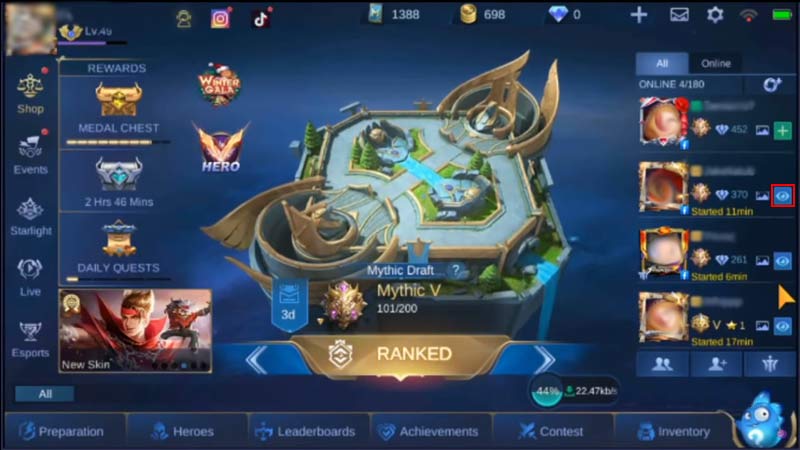
Img Credit – DionysusPlays - Next, click on the Watch button to proceed.
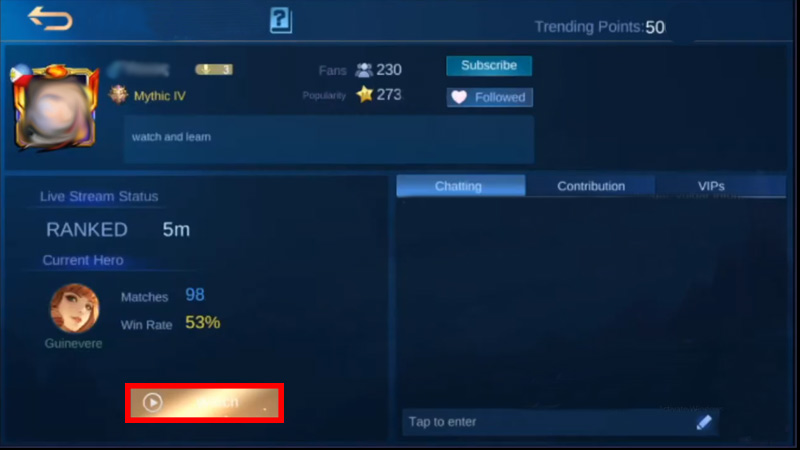
Img Credit – DionysusPlays - If you receive a notification to watch, click Yes.
Once done, you will enter the battle and be able to stream your friend’s match.
Now enjoy watching your friend play the battle with excitement, moreover, you can gift them a diamond as a token of appreciation. And that was everything you need to know on how to watch a friend’s game on Mobile Legends Bang Bang. If you found this guide helpful, check out more on this game like how to join or leave the squad in Mobile Legends. Also, you can take a look at the best ways to Rank Up fast in MLBB.