Close Menu
    Facebook X (Twitter) Instagram
    • About Us
    • Contact Us
    • Privacy Policy
    • Disclaimer
    Facebook X (Twitter) Instagram Pinterest Vimeo
    Games Adda
    • Gaming
    • Tips and Tricks
    • Tech
    • Best Buy
      • Gaming Mouse
      • Headphones
      • Laptops
      • Smartphones
      • Smartwatches
    Subscribe
    Games Adda
    Home » Mobile Legends » Steps To Join & Leave Squad In MLBB
    Mobile Legends

    How To Join & Leave Squad In Mobile Legends (Steps Guide)

    Suraj NaiBy Suraj NaiSeptember 11, 2023No Comments2 Mins Read
    Share Facebook Twitter Pinterest LinkedIn Tumblr Reddit Telegram Email
    How Can I Join & Leave Squad in Mobile Legends Bang Bang MLBB
    Share
    Facebook Twitter LinkedIn Pinterest Email

    In Mobile Legends Bang Bang players can join and leave a Squad whenever they want. Being a part of a squad has its benefits where you already have a team ready for action. It can not only allow you to make new friends but also share each other’s strategies to improve the play style. However, the game doesn’t describe much about the process of joining or getting out of a squad and leaves the players on their own. If you’re also struggling with the process, then we’ll walk you through the steps easily.

    How Can I Join & Leave Squad in Mobile Legends Bang Bang

    Below you’ll find the steps to join & leave a squad in Mobile Legends Bang Bang easily.

    • Steps to Join Squad
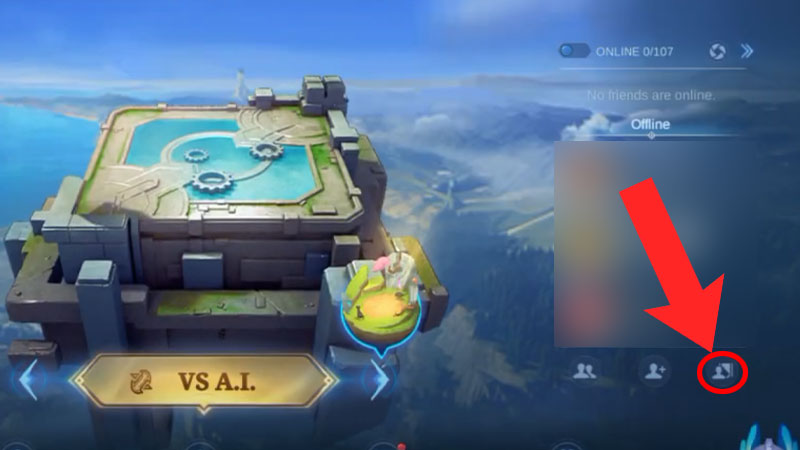
      • First, launch MLBB on your device.

        How To Join & Leave Squad In Mobile Legends (Steps Guide) Steps To Get out of a Squad MLBB
        Source Image: Janeah tv
      • Next, click on the Squad Menu option as shown in the image above.
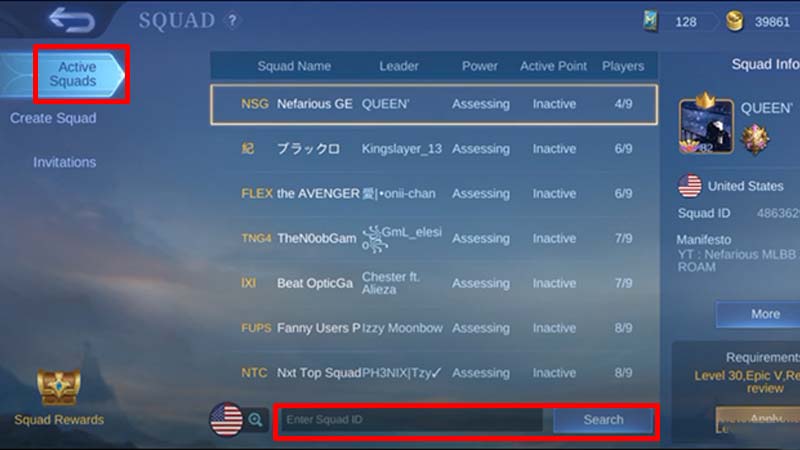
        How Can I Join & Leave Squad in MLBB steps to get out of and make squads
        Source Image: Janeah tv
      • After that, to join a squad, go to the Active Squads tab and enter the Squad ID.
      • Then, check the Requirements & hit the Join button to get into the squad.
    • Steps to Leave Squad
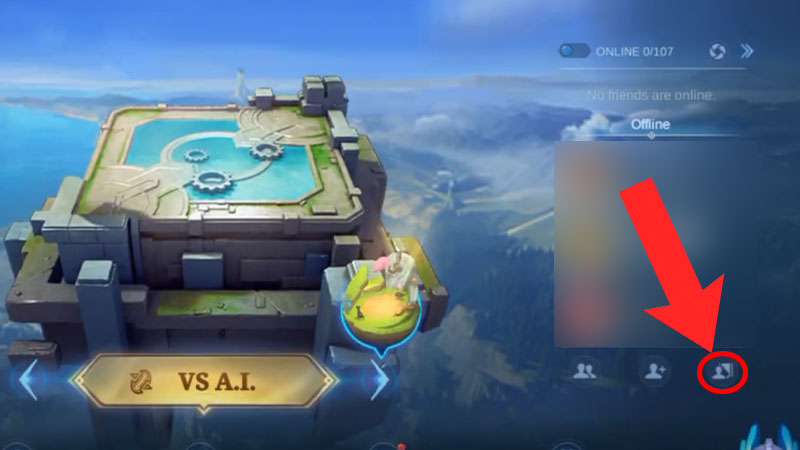
      • First, launch MLBB on your device

        MLBB Join & Leave Squad in Mobile Legends Bang Bang
        Source Image: Janeah tv
      • Next, click on the Squad Menu option as shown in the image above.
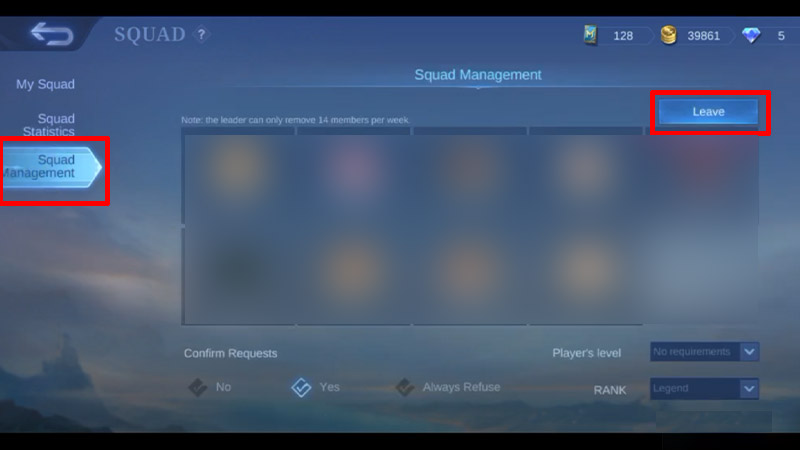
        How To Join & Leave Squad In (Steps Guide) MLBB
        Source Image: Janeah tv
      • After that, to Leave a Squad, go to the Squad Management tab.
      • Then, hit the Leave button and write ‘Quit’ in the window that appeared.

    After leaving a squad in MLBB you’ll see a new Create Squad option in the same menu to make a squad of your own. However, to do so you must be at least level 20 and will have to pay a fee of 199 Diamonds in the game.

    Also Read | How To Access & Play Advanced Server In MLBB

    This is all about how you can join & leave a Squad in Mobile Legends Bang Bang easily. If you’re looking for some freebies, then don’t forget to check out the MLBB Redeem Codes Wiki. Also, take a look at the best ways to Rank Up fast in the game.

    Gaming Gaming Guides Mobile Legends Mobile Legends Bang Bang Mobile Legends Guides Tips and Tricks
    Share. Facebook Twitter Pinterest LinkedIn Tumblr Email
    Previous ArticleHow To Call Out Lord In Mobile Legends
    Next Article Mobile Legends: How to Watch Friends Game
    Suraj Nai

    I'm that guy who is obsessed with completing whichever game I start.

    Related Posts

    Gaming

    Little Alchemy 2 Night Recipe Guide

    July 3, 2024
    Gaming

    Little Alchemy: How To Craft Lake (Full Recipe)

    May 15, 2024
    Gaming

    Where To Find And Catch Alligator Gar In Palia

    May 14, 2024
    Add A Comment

    Comments are closed.

    Facebook X (Twitter) Instagram Pinterest
    • About Us
    • Contact Us
    • Privacy Policy
    • Disclaimer
    © 2026 ThemeSphere. Designed by ThemeSphere.

    Type above and press Enter to search. Press Esc to cancel.