
In Mobile Legends, there are various ranking categories featuring from popularity, and global to top street for that too for every hero. The leaderboards showcase where players stand in the ML competition, and test their skills in the game. In this article, we will be looking into how to see your hero’s local street rank in Mobile Legends and much more.
How to Check and Show Hero Local Rank in Mobile Legend
Now, before we start, it is worth mentioning that ranked mode cannot be played if players’ credit score is below 90. Also, since the hero street rank is based on each hero’s performance. The better the player’s performance with a hero, the more hero score the player receives.
How to See Local Rank in MLBB
The local ranking also sometimes referred to as street rank is a type of leaderboard where ranking is based on a specific server, area, or street. The local rank is determined by the player’s hero rank. To check local ranking in Mobile Legends, make sure to activate your location access and then, follow the below steps.
- On your game homepage, click on the leadership icon located in the top right corner.
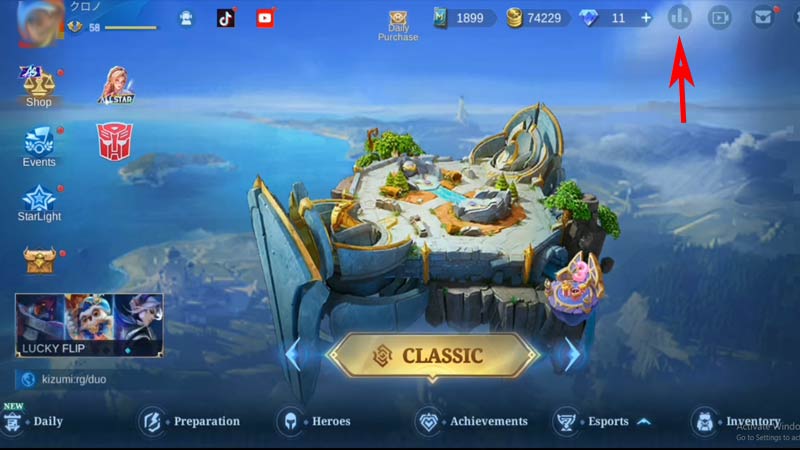
Img Credit – Yonri Plays - Next, click on the hero section and then click on the location option found in the left upper corner to calibrate your location.
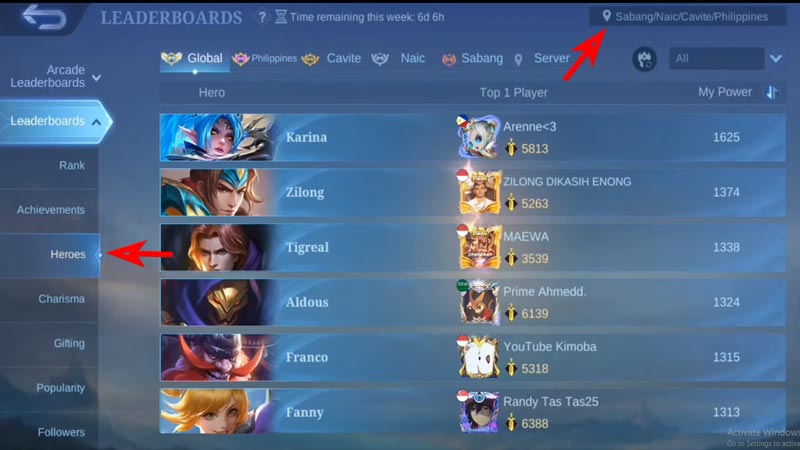
Img Credit – Yonri Plays - Make sure your device location is active, Once it calibrates your current location, click on okay.
Now, you can see your current local ranking, by clicking on the area name in the upper taps beside the server option.
How to Display Local Rank in MLBB
To show the Hero’s local Rank in Mobile Legends, follow the below-given steps:
- Click on your Profile located on the top left side of the game’s home screen.
- Now, under the setting, select Title.
- Next, you can select the tire options available
- If a title is available, select the hero and equip it.
Now that you have equipped, if the requirements are fulfilled, the rank will be displayed.
That’s everything covered for how to see a hero’s local rank in Mobile Legends. If you find this article helpful, you can check out our other guides on MLBB, like how the ranking system works or how to change servers to play in other regions. Moreover, if you are interested in getting firsthand experience of the latest updates of the game, check out this guide on how to access and play advanced servers in Mobile Legends Bang Bang.