
While playing Epic Seven, you will encounter several levels and enemies to defeat. Also, you will get to learn more features of the game as your progress further. If you’ve heard and want to know more about auto repeat in Epic Seven, you’ve landed in the right place. In this guide, we have covered how to unlock the repeat battle feature in the game. All you have to do is simply read along with this guide and follow the steps given to know this feature in and out.
How to Activate Auto Repeat in Epic Seven?
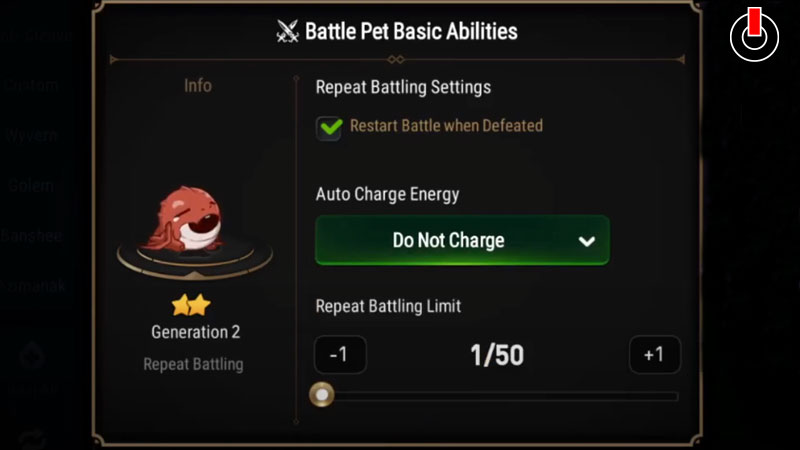
There are several things you need to do before you can activate auto repeat in Epic Seven. Firstly, you can’t access this feature if you’re relatively new to this game. You need to be an experienced player before you can enjoy this feature.
You can unlock the auto repeat feature in the game when you reach level 45 in the game. Until this point in this game, you’d have unlocked the pet system already. To those who aren’t aware of this, the pet system will be available to you once you reach level 25. You can level up your pets in the game and even feed them.
There are two kinds of pets in the game, Battle Pets and Lobby Pets. As the name suggests, the battle pets are those who participate in battles with you and the latter simply accompany you into the lobby. Now, you have to select a Battle Pet and tweak the settings a bit to get yourself going.
When you choose a Pet for the repeat battle, you have to set some ground rules. There are a few settings in the auto repeat feature. They are Do Not Charge, Recharge Energy Skystone, and Leif.
In the Do Not Recharge option, the pet will return to you as soon as its stamina is reduced to nil. In the other two options, the pet will consume the said resources, either Skystones or Leif, to restore stamina and continue battling until the limit of auto repeats is reached.
Lastly, you have to tick a check box with a paw print before starting the battle. In this manner, you can activate auto repeat in Epic Seven. Hopefully, this guide was helpful to you. While you’re here, you can feel free to browse through other similar articles such as How to Level Up Heroes in Epic Seven? and How to Get and Sell Penguins?