
Arena Breakout in its early access and beta version stage did not have the option to change the language. As the game comes from a Chinese Developer, it was available in Traditional Chinese and had no language-changing option. It was also not available for every region or country. This led the players to download software or apps like Tap to Translate Screen App to translate the in-game language. But now things have changed, and you can change language in this way.
How to Change Language in Arena Breakout
- Open Arena Breakout on your mobile or PC.
- Once the game has started, on the homepage you will see the Settings option on the top right corner of the screen.
- Tap on the Settings menu and on the left side of the screen you will find Language Settings.
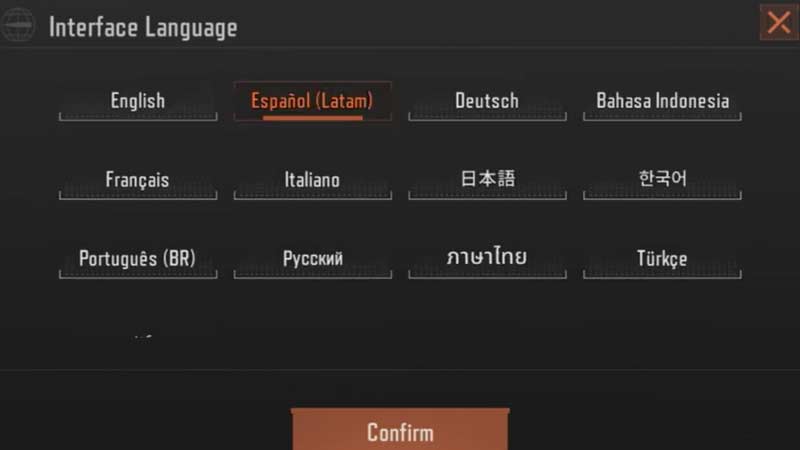
- After tapping on Language Settings you will get the Language Interface option.
- Lastly, select the language of your choice from the interface and tap on Confirm. With that, your whole in-game language will be changed accordingly.
This was how you could change language in Arena Breakout, with simple steps. The game settings also offer various other customizations, like audio settings, graphic settings, control settings, and more for a user-friendly experience. Currently, the game offers language options of –
- English
- Portuguese
- Spanish
- Russian
- Chinese
- Turkish
- Japanese
- Indonesian
- Arabic
- Thai
- German
- French
- Italian
- Korean
These were all the possible languages the game is available in. The developers yet have to make the game accessible in many other countries. We can then hope for more options. It is also recommended to keep the language of the game as English.
We hope the game has the language that you are comfortable with. If you found this article on how to change language helpful, then you can also check out how to make money and how to get more storage space in Arena Breakout.