
Error 520 is actually a Cloudflare error that happens usually when the server has overloaded. It could also mean that the server isn’t able to reach the specific website according to the request. This Error could also just be an invalid HTTP Response. It could also sometimes be an IP error, which means your IP may be blacklisted from using the website.
There are a few things that you can do to fix this Error 520. We’re gonna discuss some of the ways here.
Table of Contents
How to Fix Error 520 of Cloudflare.
Look for Blacklist.
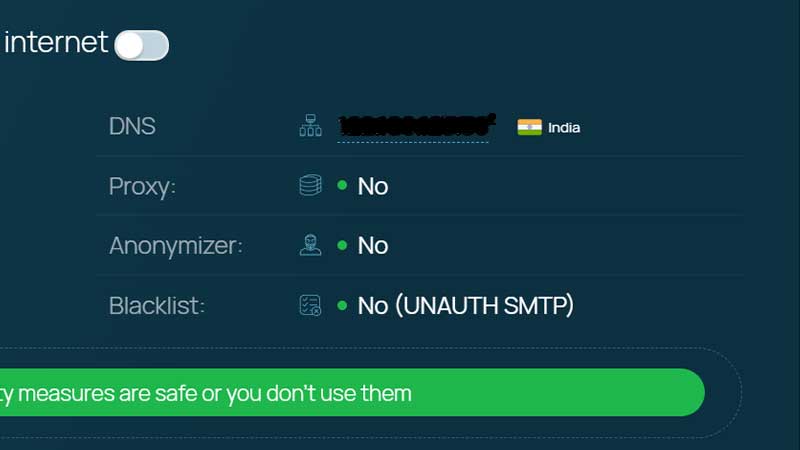
Check if your IP is blacklisted or blocked by Cloudflare. This could be one of the reasons you see the Error 520. To check if your IP is blacklisted, follow these steps.
1. Go to Whoer.net
2. Wait for it to load.
3. Check if Blacklist is showing No.
If it says Yes on Blacklist, your IP is blocked. In this case, you will have to use a VPN to access the site. Alternatively, you can follow the below steps.
Restart the Server
Another reason for Error 520 can be the server crashing or not loading correctly. You can simply restart the webserver and try to reload the site to see if that fixes it.
Disable Cloudflare
Disabling Cloudflare will help you in two ways. You can find the error faster and even reset your Cloudflare settings in case it is a problem with Cloudflare. Follow these steps to disable your Cloudflare.
1. Log in to Cloudflare, click on your site.
2. Go to DNS, and click on the orange cloud under Proxy Status.
3. Once the cloud goes grey, it has disabled.
Check Error Logs
Once you have disabled your Cloudflare and restarted the server, you can check logs for any errors to fix Error 520. Follow these steps to check error logs via Cpanel.
1. Go to Cpanel and log in.
2. Scroll to Metrics, click Errors.
3. Here you can check all the errors that occurred.
To conclude, there is a lot of reasons why Error 520 might happen. Most of the errors can be solved via Cloudflare reset. However, if it still does not fix after Cloudflare reset, contact your website hosting. Hopefully, these steps can help you get rid of Error 520. Here is how you can fix the HTTPS error in FFXIV.