
YouTube is one of the biggest video streaming platforms today. There is a plethora of video content that ranges from entertainment videos to informational videos. Millions of users upload a variety of videos each day and the viewers are always consuming content posted on the platform.
Having said that, there is also an age restriction feature which enables the users to filter the recommendations and video choices for under-aged viewers. But is it foolproof or can be infiltrated easily? We have covered the answer to this question and a way to Bypass YouTube Age Restriction in this guide. Read along with this guide to learn more about the same.
How to Bypass YouTube Age Restriction & Watch Videos on Android & iOS?
Well, YouTube users have no specific age groups. People from all walks of life and of different ages stream videos on the platform and hence YouTube has designed a way to refrain users from uploading any inappropriate content. And even if the users bypass the ground rules, the age restriction policy filters the audience viewing the said video.
But, there are ways through which you can carve out a loophole to this policy. However, here are the steps given to Bypass Age Restriction on YouTube on Android and iOS.
- Open the YouTube app on your device
- Click on your Profile
- Navigate to the Settings tab
- Tap on the General tab
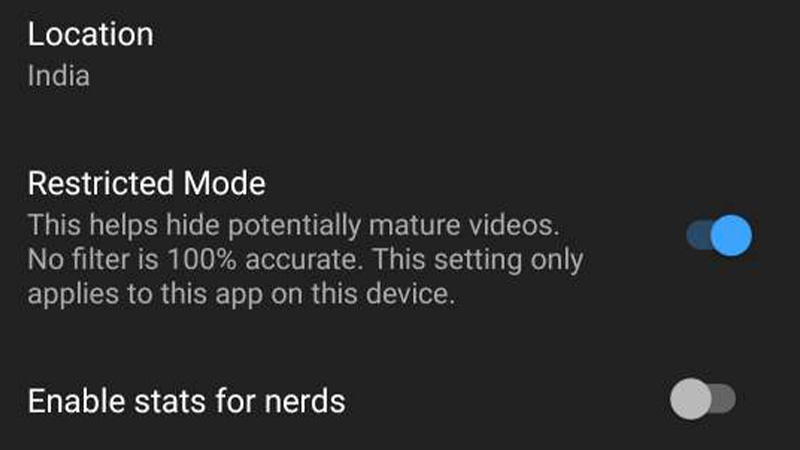
- Find Restricted Mode and slide the button to switch it off
In this manner, you can tamper with the settings and have a go at watching age-restricted content freely. These steps apply to both Android and iOS devices. You can try out these steps and Bypass YouTube Age Restriction on both devices.
Hopefully, this article was helpful to you. While you’re here, you can go ahead and check out other similar guides such as How to Hide Subscribers Count on YouTube? and How to Fix An Error Occurred, Tap to Retry on YouTube?