
The new Hearth and Home update in Valheim have come out recently. There are loads of items, builds that came with it and the Valheim Cartography Table came with it. The Cartography Table is a very useful item indeed. It allows your friends in Valheim to read your map and find all the locations you have gone to. Below is a guide on how to get the cartography table.
How to Craft the Valheim Cartography Table?
You can make the Cartography Table using the Workbench. The table can be crafted using 5 items. All of the items are fairly easy to find. Once you have all of them you can simply select your hammer, Open MISC, and build the Cartography Table. These are the following items you need:
- Fine Wood x 10
- Bone Fragments x 10
- Bronze x 2
- Raspberries x 4
- Leather Scraps x 5
Place the Cartography Table wherever you want it and where your friends can interact with it.
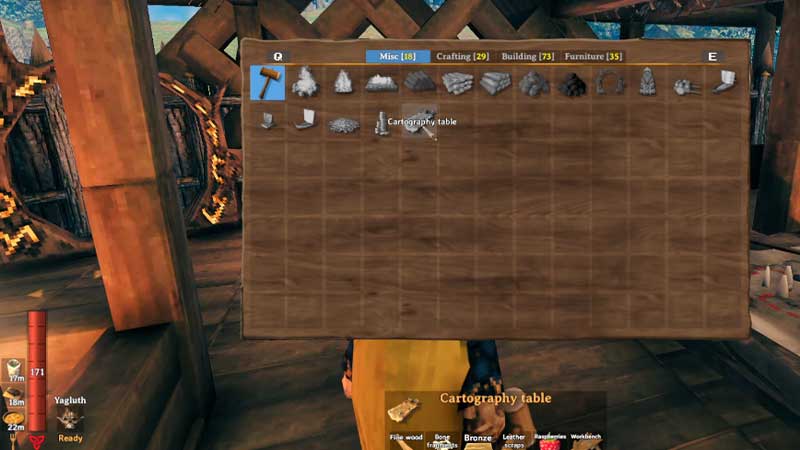
How to Use the Cartography Table in Valheim?
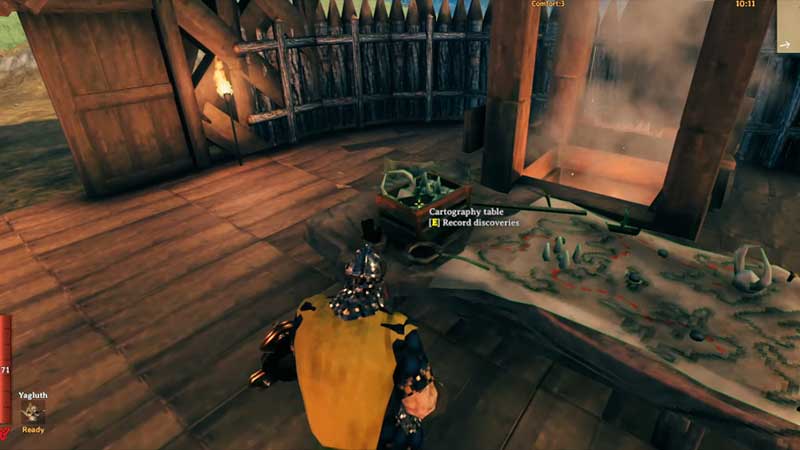
Once you have the Cartography Table all you need to do is stand next to it. You will see options to either Read Map or Record Discoveries. When you click on Record Discoveries, it will record your whole map on the cartography table. This means that anyone else in your game can now check everywhere you have been on the map. It even logs waypoints.
When you open the Map, you can see all your locations and other players’ waypoints too. You can turn this off by click on the Cartography Table on the bottom right of the map.
This table makes it very easy and fun for all players to play with their friends on the same server. You no longer need to have confusing conversations about where to find what and head in what direction. Every time you explore a new location, make sure to record it on the Cartography Table for your fellow players.
We hope you like this mini Valheim Cartography Table Crafting Guide. Check out this guide to Craft an Obliterator.