
Arena of Valor is an action role playing game which you can play on Android and iOS platforms. In this game, you can change your region from within the game. Each region has a server which the players can access while playing the game. You can’t change the server in Arena of Valor except VPN but you can change the region you are playing from. In this guide, you will learn how to change region in Arena Of Valor(AOV).
How to Change Servers in Arena Of Valor?
There are two kinds of Servers in AOV, English Servers and Non-English Server. These servers are dedicated to various regions. You can always use VPN to switch between servers. The list of the Regions which vary according to the Server are given below.
The Regions that are included in the English Server:
- Asia
- Canada
- Europe
- Garena (Singapore, Malaysia, Philippines)
- Latin America
- North America
The Regions that are included in the Non-English Servers:
- Hong Kong
- Indonesia
- Korea
- Macau
- Taiwan
- Thailand
- Vietnam
If you opt for Garena Server, you can choose from only the three regions only – Singapore, Malaysia, Philippines. Also, if you change servers in AOV, you will be able to play with different heroes as each server has various heroes to play.
How to Change Region?
As you now know that you can only change regions in AOV and now servers. These steps that will help you to change the regions while playing AOV.
In order to Change Region in Arena of Valor, follow these steps,
- Click on your Profile
- Select the Settings Icon beside your profile on the screen
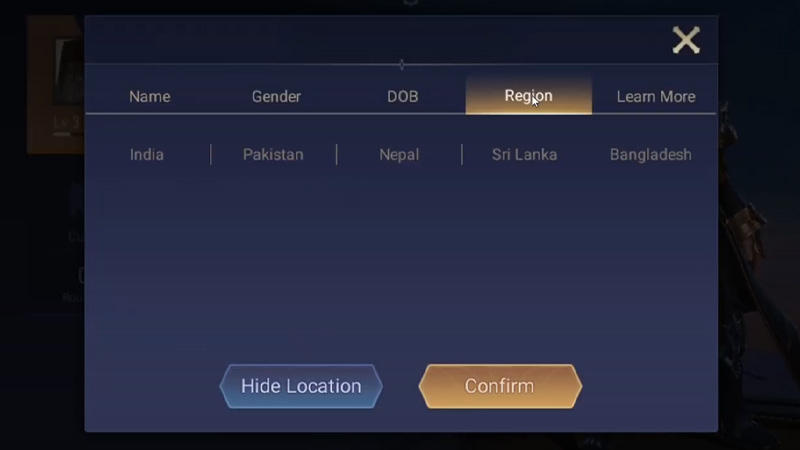
- Among the other tabs, select Region tab
- Choose among the available regions and hit Confirm
And your region will have changed accordingly.
Through this process, you can change the regions and servers in Arena of Valor. Hopefully, this guide was helpful to you. While you are here, you can go ahead and check out Best MOBA Games for Android and Arena Of Valor Tier List.