
Star Trek Fleet Command takes place at an intergalactic level. Here you are free to roam and explore other galaxies and stars. As well as you also get several missions which give you a level up and resources. You can attack other players for their resources or you can ally with them. But for doing all that you are going to need a good ship and commander. In this article, we’ll see how you can promote your officers in Star Trek Fleet command.
How to Promote Officers in Star Trek Fleet Command
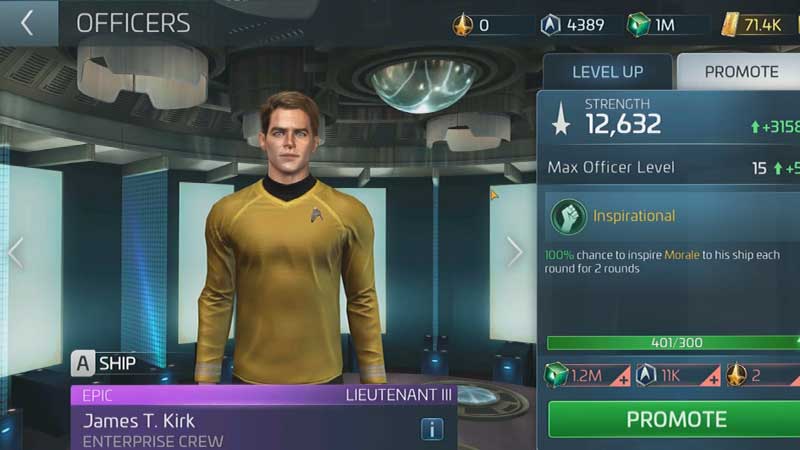
- On the upper left side of your screen you’ll see “Officers” Options.
- Select it, and now you’ll be able to see officers.
- Above the picture of every officer is their name written.
- Below their picture you’ll see a bar.
- If it’s green then that means you have all the necessary resources for upgrading it.
- In case the officer you want to promote has gray bar. Click on their picture and see what is missing.
- Now select officer, you’ll see a box with window options.
- Go in the Promote.
- Promote button is bottom right of your screen.
- In that window you’ll also see their Strength and how much you increase it by promotion.
- Now click on the “Promote” button.
Promoting officers of different ranks needs a different amount of resources. Such as if you want to promote A rank officer like James, then you are going to need more than 1 Million officer XP. Officers come with different rarities which can be figured out from their color panel. Purple is a rare one that is most desired and promoting them provides you with more power than promoting some gray color officer who is common.
How to Know Rarity of Officer Through Color
Officers can be divided into four colors.
- Gray is a common officer.
- Green is an uncommon one.
- Blue, those are rare.
- And lastly purple, who is epic.
What Different Badges Do Officers Need for Promotion?
There are so far three badges that you are going to need: Science, Engineering and Command.
If this article on how to promote officers in Star Trek Fleet Command helped you then check out our other article our another article on how to attack other players in Star Trek Fleet Command.