
Epic Seven is an RPG adventure mobile game provided by South Korean video game publisher Smilegate. That is available on both Android and Mac. Heroes here have unique skills and abilities that can be enhanced using various methods. One such method is Specialty Change. Check out this guide to perform Specialty Change in Epic Seven.
Epic Seven: How to Specialty Change
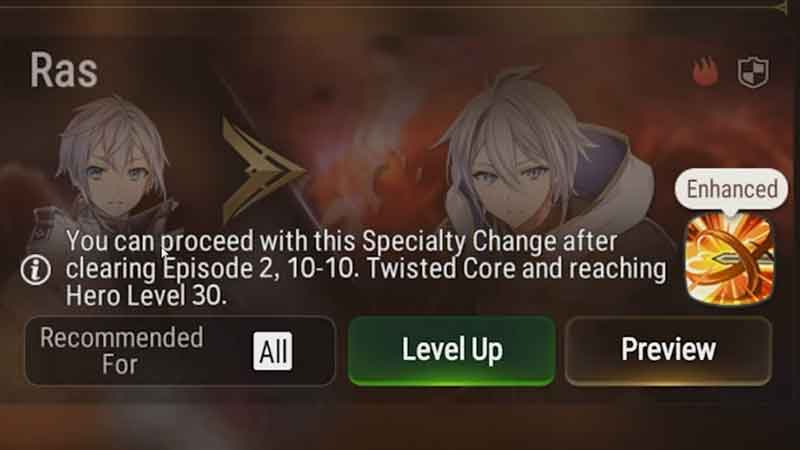
Specialty change is a unique system that changes the value of three-star heroes. Like most of the game, the five-star list consists of the top characters. But that can be changed using this Specialty Change feature. And after the recent updates, it has gotten a lot easier and better. This change can be so powerful and useful that max-star heroes would be weaker in front of these three-star characters. When Heroes undergo Specialty Change, their appearance and skills both change. And these new skills and abilities can be further developed using Skill Tree.
Perform Specialty Change
To perform the Specialty Change, you first need to go into the lobby. Then choose the “Hero” option on the bottom left of your screen. There you will see the “Recruit” button. Tap on it, and you will see two card-like options. Choose the second option, “Specialty Change“. You will get a walkthrough if you are using this feature for the first time.
The screen will be divided into two sections. The upper section shows all the heroes that have met the Specialty Change requirements. There is only one requirement for the majority of heroes. They have to reach level 30. But there are exceptions also, like for Ras you need to reach level 30 and clear Episode 2, 10-10. Tap on the preview button in the character box of any available heroes. You will see two options on the left corner of your screen. Tap on the second option, “Specialty Change Quests“. All characters have four quests lined up for them. Finish the quest to complete the Specialty Change. And remember, you can only have two change requests at a time.
Here you learned about how to Specialty Change in Epic Seven. If you are looking for more gaming guides like this. Check out how to get Spirit Eye Celine and the tier list.