
Pokemon Unite was allowing players to claim Zeraora for free in the early days of the game. However, now you can’t just claim the Pokemon for free. Players do have another chance to add this Pokemon to their rosters in Pokemon Unite Mobile.
The update on September 22nd added this new event to the list which allows you to complete missions to add Zeraora to your roster.
Get Zeraora in Pokemon Unite for iOS & Android
Earlier on, players could get Zeraora by just redeeming a bonus at the beginning of the game. However, now you have to do it through gameplay. Here are the steps to check your Zeraora missions and progress:
- Click on your Trainer Account on the Top Left corner of the screen in the lobby.
- Click on the Events tab.
- Scroll down till you see Zeraora Mission. Click on it.
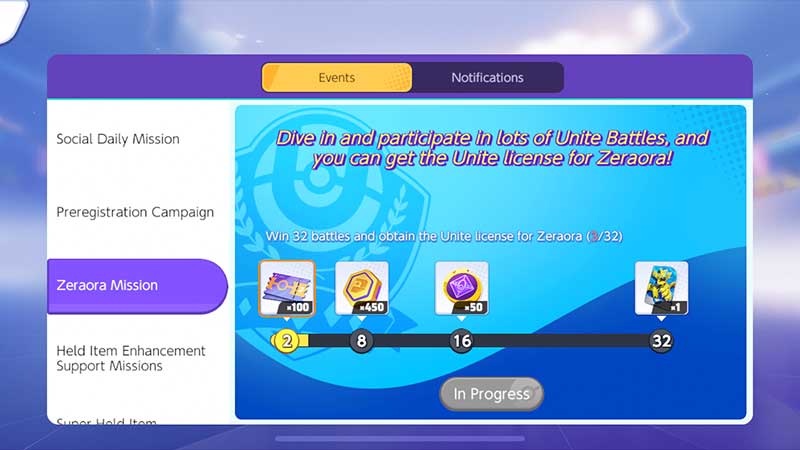
- Once the tab opens, you can see it says “Win 32 battles and obtain the Unite license for Zeraora“.
Here are the rewards for the Zeraora Mission
- 100x Aeos Tickets – Win 2 Games
- 450x Aeos Coins – Win 8 Games
- 50x Item Enhancer – Win 16 Games
- 1 Zeraora License – Win 32 Games
You’ll see a progress bar on the bottom that allows you to claim rewards after winning 2, 8, 16, and 32 games respectively. You get the Zeraora license after winning a total of 32 games.
How to Start a Game in Pokemon Unite
If you’re completing daily missions or even going to complete the Zeraora Mission, you need to play games and also win them. If you’re new to Pokemon Unite and wondering how you can start a game, follow the steps below.
- Start the game and stay on the main page.
- Click on the Unite Battle button on the bottom right corner of the screen.
- It will take you to the match screen. Here you can invite your friends to the game by clicking the + sign next to your Trainer. You can even click on Random Match and change the type of game you want to play. On the top right, you can select from Ranked, Standard, or a Quick game too!
- Click on Start once you have picked your game type and invited your friends.
Now all you have to do is win the game! We hope this guide helps you to get Pokemon Unite Zeraora for free. In order to have the best gameplay, you can check out our Talonflame Build Guide here.