
You must have come across the Regional Rank in PUBG/BGMI recently. The Regional Ranking system is a new addition in PUBG/BGMI. In this new update, the players will have to select their respective regions before commencing their gameplay. But what exactly does this addition mean? Well, lets get into this guide and figure out what this new feature has to add in the game.
How to Earn Regional Rank in PUBG/BGMI?
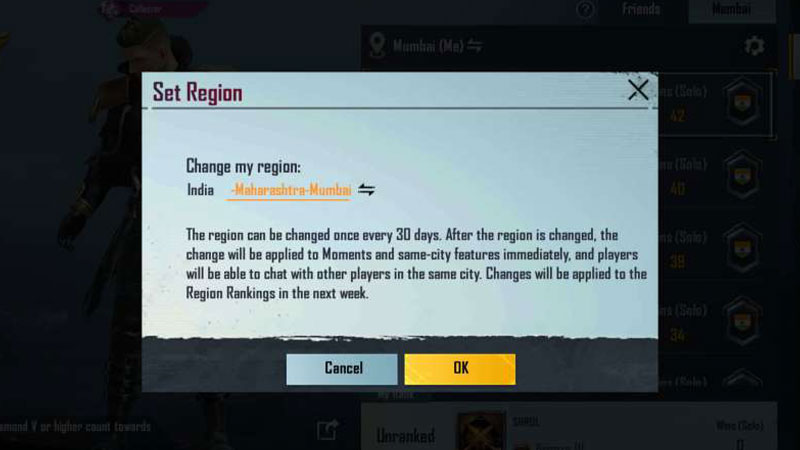
Recently there was a new update in PUBG/BGMI , and in that update a new Region feature was introduced. Now, you will have to select your respective region in the game before playing it. Now, as per the region that you selected, the game will open doors for you to play and chat with the players who share your region. Also, remember that once you’ve selected a region, you won’t be able to tamper with it for the next 30 days.
In this Region, you will have to select the City and the State that you will be playing from. You will encounter the players from your selected region and put up a fight to survival against them in the game. According to your performance in PUBG/BGMI, you will be ranked in your region.
The regional rank in PUBG/BGMI that you will earn will only be active for a week. So, if you want to stay on top, you will have to give your best every week to maintain your rank. As per your rank, you will be provided an in-game title.
How to Showcase your Rank in the game?
It is futile if you earn your place on the top of the leaderboard and not flaunt your skills. You can check your rank in the leaderboard. To access the leaderboard, follow the steps given below.
- On the bottom right of your screen, you’ll see an upward arrow.
- Tap on that arrow and you’ll a list of options. Select Region.
- When you click on region, you will see the leaderboard and the ranks on it.
If you’re on the leaderboard among the top players of your region, you can share your rank with your fellow players and competitors.
Now that you know how to earn and showcase your regional rank in PUBG/BGMI. Hopefully this article was helpful to you. While you’re here, you can check out the best Android Phones to play BGMI 2022 and how to get Free Emotes in BGMI.