
PUBG Mobile is a battle royale game that has seen unprecedented success. While it is a great game to play alone, it is 1o times better with some friends in your squad. Players can have up to 369 friends on their Friend List at a time. However, if players run out of space they can always unfriend inactive friends from their list to create some space for new friends in PUBG Mobile.
In addition, players often add strangers as Friends in the thrill of the match and might experience some discomfort over their choice later. There have been regrettable instances of bullying and harassment due to this reason. Such cases must immediately be reported in the game. However, it is also quite simple to unfriend other players in PUBG Mobile. If players are uncomfortable with another player on their Friend List, they can easily remove them with the following steps.
How To Unfriend Others In PUBG Mobile?
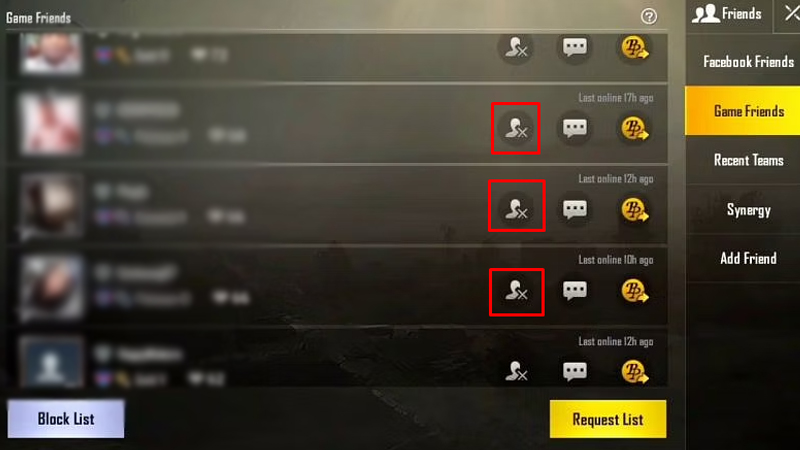
Whether you want to remove an inactive friend or disconnect with an obnoxious player in the game, here is a step-by-step guide to unfriend others on PUBG Mobile.
- Open the PUBG Mobile game on the device.
- After reaching the main lobby, go to the Friends option that is located towards the left of the screen.
- Here, players will see an option saying Game Friends.
- Click on it to display all of the friends that a player has.
- Find the player that is to be removed from the list.
- Click the X option located near the name.
- Press OK to confirm the removal.
- The removed player will no longer be a part of the Friend List.
That is all that needs to be done to unfriend others in PUBG Mobile. If players are curious about auto-aim in PUBG, they should check out How To Auto-Aim In PUBG Mobile?