
Oculus Quest 2 is a new all-in-one VR that can be your one-stop solution to play all your favorite video games. You can download the Oculus Quest 2 App on your phone or PC to buy various games and other accessories from the Oculus store and enjoy them on the VR.
If you want to purchase anything from Oculus Store and you are looking for different ways to make payments then here is a complete guide for you. Learn how to add or remove a card from your Oculus Quest 2 App and change the payment method by following a few easy steps. Without any further ado let’s dive into it!
How To Change Payment Method In Oculus Quest 2?
Once you download the Oculus Quest 2 app on your mobile or on your PC it is very easy to add or remove payment methods from your account. So, install the application on any of your preferred devices, sign in to your Oculus account by filling in your login credentials and then follow the steps written in the guide below to change the Payment method successfully.
Steps To Change Payment Method On Phone/Pc –
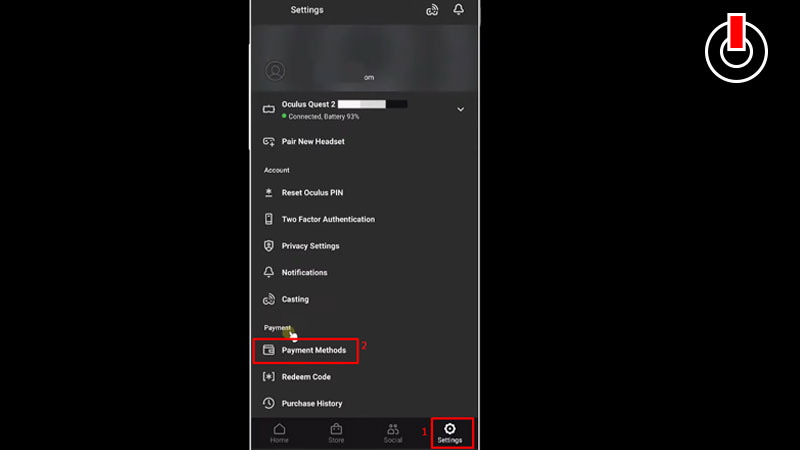
- Open Oculus Quest 2 app on your device.
- Look for the Settings icon at the bottom of your screen and click on it.
- Scroll down and go to the Payment Section.
- Click on the Payment Methods option.
- Here you will find two options to make your payment: Add a credit or debit card or Add a PayPal account.
- Hit any one of the options to set the payment method. Fill in your card details and set your payment method successfully.
- Now to remove a payment method, click on the three-dot icon next to the card or your PayPal ID.
- Click on the Remove Account option to change the payment method on Oculus Quest 2.
This is everything you need to know about how to change the payment method in Oculus Quest 2. Check out another article on how to cast Oculus Quest 2 to Roku Tv.