
Roblox is a game that is created by players for the players. Every game is unique in itself, one such game is Find the Markers. Currently, there are 211 markers in it. In this article, we’ll see how you can find and get a noob marker in Roblox Find the Markers.
How to Find and Get Noob Marker in Roblox Find the Markers
Find the Code
- First you need to login into your account using your computer or laptop.
- Depending on your phone, you can log in from it too.
- Go into your profile and check your URL, there you’ll see a number in this format “roblox.com/users/645637457 (this can be any number, every player has different numbers).
- If accessing through phone, select the upper right corners three dots in the line of URL.
- There in the list you’ll see a Desktop site option, activate it, and you can deactivate this afterwards by following the same process.
Microwave
- Walk the stairs which lead to pe Olde Shop and then take left.
- You’ll see a brown house with stairs leading to the second floor.
- Climb those stairs and go to the second floor, inside the house you’ll see another set of stairs climb up and go towards the kitchen.
- Click on the microwave, and a keypad will open, type the number you got from your URL.
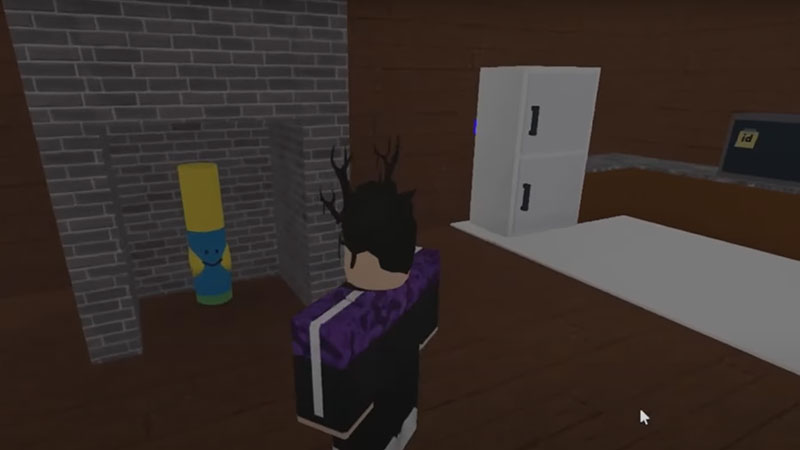
- As soon as you type the correct code, a noob marker will appear in the chimney of that kitchen.
How to Login to Your Account Through a Computer
- Go to your browser, it can be any browser.
- Type roblox.com in your URL section.
- A sign-up page will appear, if you are a new player sign up by entering your date of birth, username, password and gender.
- If you already have an account, then on the upper right side of your screen you’ll see a Log in button, click on it.
- You’ll get redirected to a Login page, type your username, email or phone number and then your password for logging in.
This article was about how to find and get noob marker in Roblox Find the Markers, if you are looking for a more such article then check out more Find the Markers guides.