
There are a large number of elusive Pokemon waiting to be caught in Pokemon Go. However, often you can end up with a number of duplicate Pokemon that you do not want. A great solution for this dilemma is to transfer the unwanted Pokemon to Professor Willow. This will not only free up space but the Professor will also give you candies in exchange. If you have a lot of spare Pokemon, it is also possible to mass transfer in Pokemon Go.
How To Mass Transfer In Pokemon GO?
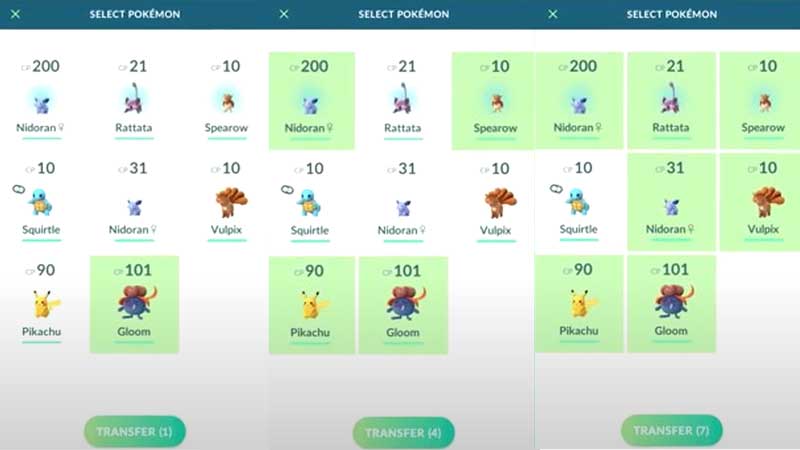
Mass transferring Pokemon to Professor Willow is a good way to get rid of multiple Pokemon at once instead of transferring them one by one. However, you must pay attention to the Pokemon you are transferring. The exchange of Pokemon is irreversible and you won’t be able to get your Pokemon back once it has been transferred.
Keeping this in mind, it is advisable that you favorite the Pokemon you don’t want to transfer. This will keep them safe from being traded accidentally. In addition, you also can not transfer Pokemon that are defending gyms or have been assigned as the Buddy. You can follow the steps below to mass transfer Pokemon.
- Open Pokemon Go and go to your Pokemon screen.
- Long press and select the Pokemon you want to transfer. The Pokemon will be highlighted in green once selected.
- Now, you can go through the list and select as many Pokemon as you want to transfer to Professor Willow.
- Once you have made all the selections, click on the Transfer button located at the bottom of the screen.
- Your selected Pokemon will be transferred and you will get a Candy for each Pokemon transferred.
This is how you can mass transfer in Pokemon Go. For more Pokemon Go guides, check out How To Evolve Galarian Yamask In Pokemon GO?