
MIR4 is one of the most talked-about play-to-earn games right now. There are millions of users who have downloaded this MMORPG and enjoying it on Mobile and PC. Unlike other video games, the developers of MIR4 have a zero-tolerance policy against cheaters or players using unauthorized programs/software or tampering with game data.
According to the data shared on Steam, the developers of MIR4 have suspended or banned more than 4,443,800 accounts so far. If you too are on the list of MIR4 banned or suspended users and want to get your MIR4 account unbanned then look no further as we have got you covered.
Without any further ado, let’s get started:
MIR4 Account Suspended: How to unban your MIR4 account?
There are plenty of MIR4 users who reported that their account got banned or suspended for no reason. If your account is also on the list of suspended accounts then you will have to submit a support ticket to the developers of the game. If your MIR4 account is banned for no reason then there are chances that you will get your account back.
If you are 100% sure that you did not do anything wrong and want to get your MIR4 account back then you will have to follow the below-mentioned steps:
- Visit the official MIR4 support website. You can visit the site by clicking on this link.
- Once you are on the site, click on the three horizontal lines located in the top left corner of the screen.
- There, you will have to click on the ‘Contact Us’ tab. Make sure you have logged in to the site by using the MIR4 account.
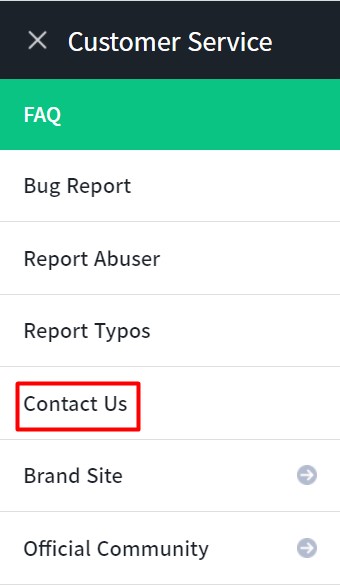
- When you click on the ‘Contact Us’ tab, a new pop-up window will appear on the screen.
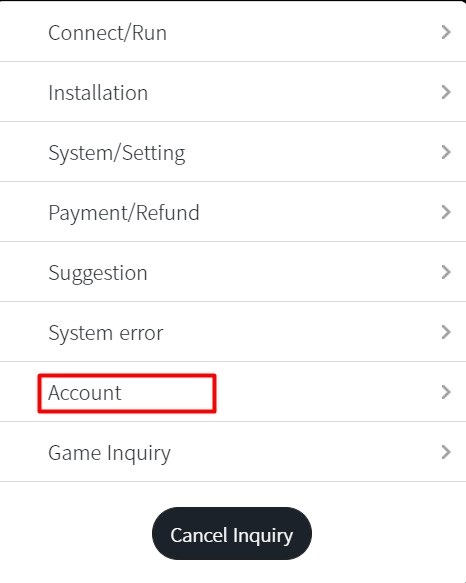
- Click on the ‘Account’ tab and then ‘Objection of restriction’.
- When you do so, you will be asked to submit a few details regarding your MIR4 account.
- Once you are done submitting them, click on the Register button.
- That’s it.
Note: Once you have submitted a support ticket, you will have to wait a couple of days because the devs are getting a lot of inquiries on a daily basis. Once they go through your inquiry, they will review your account activity. If they don’t find anything illegal in your account activity, your account might be unbanned.