
While playing Epic Seven, there are lots of aspects that the players can customize according to their style of gameplay. One of these factors is the skin of the heroes. The developers have given the liberty to purchase, earn and apply different skins to your heroes. If you’re trying to figure out how to change skin in Epic Seven, this is the place to be.
In this guide, we have explained the steps of switching the available skins of the hero in the game. You simply have to go through this guide to learn the process and implement it in your gameplay whenever you feel like it.
How to Change Skin in Epic Seven?
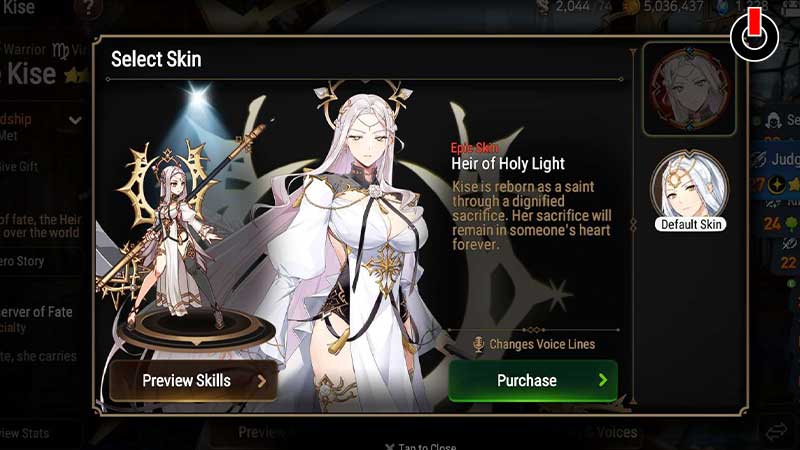
You can get your hands on various types of skins in the game. Kindly note that the heroes can only wear the skins dedicated to them. If you have alternate skins of heroes, you might want to learn how to change skin in Epic Seven.
Some of the skins can be purchased from the shop, some can be earned through the Epic pass. If you don’t have the Epic pass and would like to buy the skins from the in-game shop, you need to have Skin Tickets. The Skin Tickets, as the name suggests, are only used to buy skins of different heroes. Once you’ve got your favorite skin of your hero, you can begin the process of switching the skin.
Below, we have mentioned the steps to switch skins in Epic Seven. Glance through the steps properly to make no mistakes while implementing them.
- Open Epic Seven on your device
- On the main screen, click on the Hero tab
- Select a hero that you have a skin of
- Switch to the Details section from the Standard
- Click on the Dress icon near the bottom center of the screen
- Select the Skin you wish to apply
- Click on the Equip button
This is how you can change skin in Epic Seven. Hopefully, this guide was helpful to you. While you’re here, you can feel free to browse through other similar articles such as How To Change Account Type in Epic Seven? and How to Level Up Phantasma?