
Cookie Run: Kingdom is one of the most popular Mobile free-to-play RPGs right now. What makes this game quite popular among fans is it does have an option allowing its users to design their own Kingdom as their liking. There are tons of fans who have been having trouble obtaining Decor points in the Cookie Run Kingdom and if that’s you then look no further as we have got you covered.
When you expand your Kingdom in the Cookie Run Kingdom, you will have Decors unlocked. For the unversed, Decors are objects that need to be placed in your Kingdom to get Decor Points. Decors in the game have been divided into three types — Basic Decors, Cookie-specific Decors, and Landmarks.
Before we explain how to get Decor Points in the Cookie Run Kingdom, let’s learn what Landmarks and Decord Points are used for.
Landmarks:
Landmarks are considered as the best Decors in the Cookie Run Kingdom as they give special effects and bonuses that become stronger and upgrades. Getting your hands on Landmarks Decor is not as easy as it sounds because it will cost you tons of Coins and Crystals. To get Landmarks Decors upgrades, players need to have Aurora Materials.
Decor Points
Those who have been playing the Cookie Run Kingdom for months must know the importance of Decor Points. For the unversed, it is used to get your Cookie Castle upgraded. Besides this, you can also use Decor Points to unlock achievements. If you are falling short of Decor Points in the game and don’t know how to get them then keep reading this guide.
How To Obtain Decor Points in Cookie Run: Kingdom
To earn Decor Points in the Cookie Run Kingdom, you will have to build decorations in your Kingdom. There is a build button located in the bottom left corner of your Kingdom, tap on it and select Decors to see what decorations you currently have. When you do this, you will be shown all Decoration themes. Currently, there are 27 Decoration themes available in the game.
When you take a look at the list of Decorations themes, you will notice that each Decor comes with a price. Upon purchasing a set of Theme, you will be given rewards in the form of Crystals.
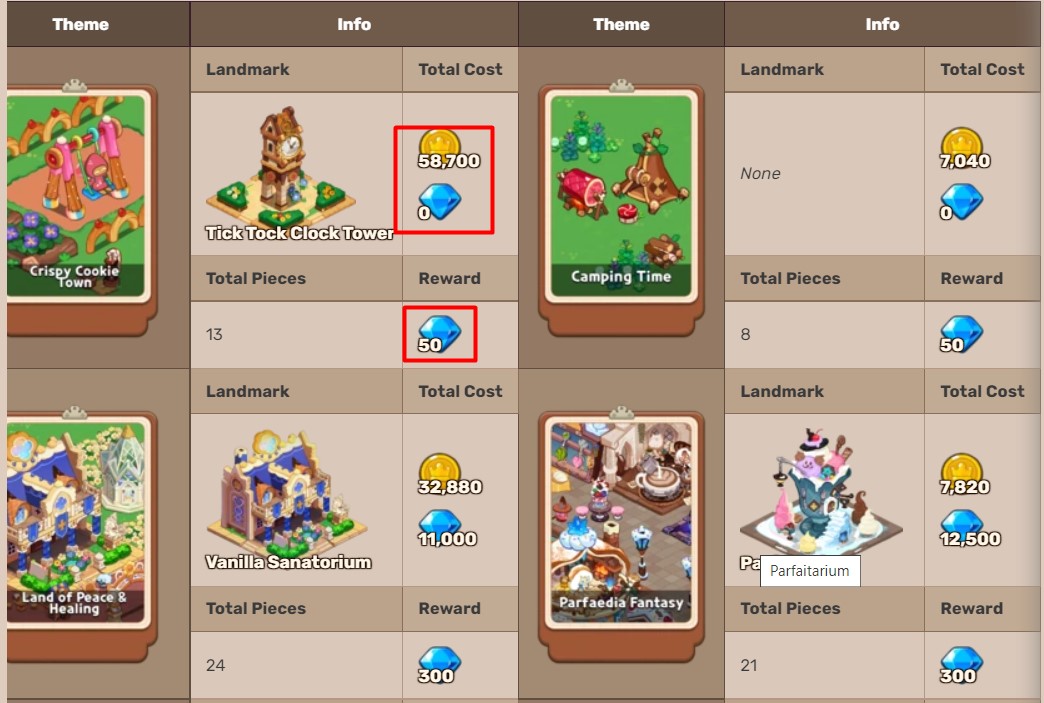
For Example: If you buy a Theme called Crispy Cookie Town which costs you 58,700 Golds, you will be given 50 Crystals as a reward. For a better understanding, you can refer to the above picture.
If you have a lot of Golds in your inventory, I advise you to buy as many Decorations themes as you can. The reason why I advise you to invest in Decorations themes is, Production building will get you a lot of Decor Points.
That’s everything you need to know about how to earn and get Decor Points in the Cookie Run Kingdom. While you are here, you may like to check out the list of working and active Cookie Run Kingdom codes.