
Spotify app is one of the biggest free music streaming apps across the globe. Users now have one stop for various genres of music with myriad artists, both aspiring and established. With millions of songs at your fingertips, you can choose your favorite ones and store them on a playlist.
Apart from that, there are various playlists that you may like, which are created by the developers and many other users. Well, as you can create a playlist in the app, there is also a way to delete a playlist in the app. Read further in this guide and you will learn how to Delete a Playlist on Spotify.
How To Delete Playlist from Spotify Library?
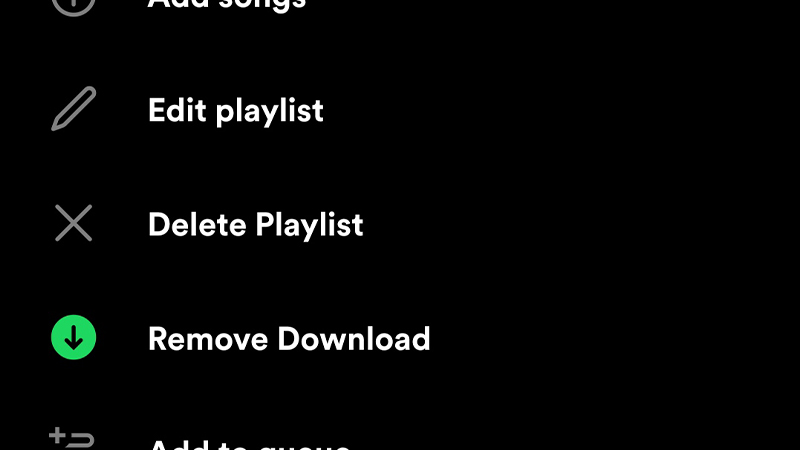
Well, fortunately, the method to Delete a Playlist on Spotify is universal throughout various devices. So, you don’t have to worry about following different procedures on different devices. In order to know how to delete a playlist, follow the steps mentioned below.
To Delete a Playlist on Spotify,
- Open the Spotify app on your device
- Click on the Your Library tab
- Then Select the playlist you want to delete
- Click on the Three Dots tab on the screen
- Select the Delete Playlist option
And the playlist will be deleted. But, keep in mind that you can only delete the playlists that you have created. In order to get rid of the playlists created by other users or the default playlists on the app, you have to, unlike that playlist. To know how to do so, refer to the steps below.
To Unlike a Playlist on Spotify,
- Open the Spotify app on your device
- Click on the Your Library tab
- Click on the Playlist you want to Unlike
- Tap on the Heart icon in green
Tapping that icon will deselect the playlist and it will be removed from your library. This is how you can Delete or unlike a Playlist on Spotify. Hopefully, this article was helpful to you. While you’re here, you can feel free to check other similar guides such as how to Install Spotify Mod APK for free and how to connect Spotify with TV, PS4, and PS5.