
Apex Legends is a free-to-play hero shooter game that has four main battle royale maps. However, to keep things interesting, Apex Legends developers have created the map rotation system. Players that want to keep an eye on the map rotation will find out how they can do so in this article.
How To Check Apex Legends Map Rotation?
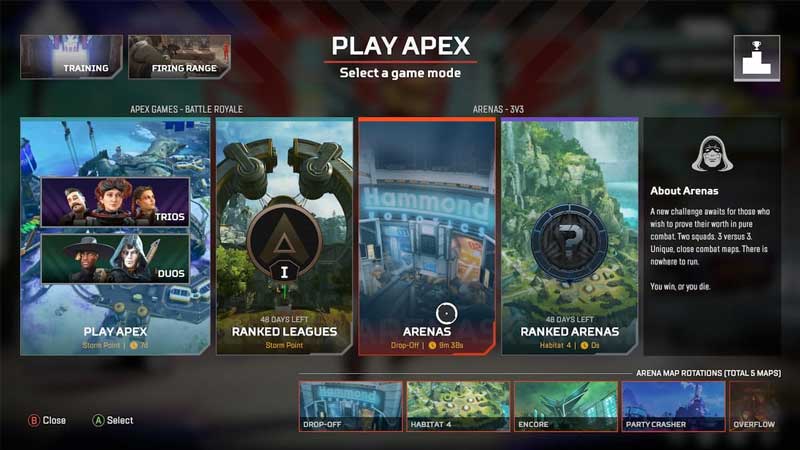
There are two ways that players can check the Map Rotation. One is directly through the game while the other is through the help of online map trackers. Let us take a look at both these methods below.
In-Game
Through the map rotation system, competitive players get a feel for each map in the game. This way players will be familiar with Kings Canyon, World’s Edge, Olympus and Storm Point. In addition, the rotation also ensures that players do not get oversaturated with a certain map.
If player want to check the Apex Legends Map Rotation for their particular season, it is not difficult to do so. Players can open the game and select the desired game mode for which they want to check the map rotation. Here, players will be able to see all the maps in rotation for that mode. Players can also check up the map rotation for all modes through the game mode selection screen. In addition, players will also be able to see the amount of time left for each map until the next one comes in to replace it.
Online Map Trackers
In case, players are looking for a way to check the map rotation without opening the game, they can do so with the help of online map trackers. These are not official trackers but third party sites that can help players keep a track of what map is in rotation and what map will follow it.
Players can use trackers like Kuro’s Apex Map and Apex Legends Status’ current map tracker. These trackers not only let players check the Apex Legends Map Rotation for both modes, it also enables players to set notifications for when their preferred map is about to come into rotation.
This is how players can check the Apex Legends map rotation. For more Apex content, check out Apex Legends Mobile: Does It Support Cross Progression?