
In Mobile Legends Bang Bang, players tend to create a new second account to try new strategies. They usually do this to avoid risking their current progress and diamonds. Apart from that, some veteran players even do this to start from scratch and regrind all the ranks. However, the game doesn’t describe much about getting a second account while already having one. But don’t worry, we have just the right trick for you. Below we have mentioned everything you need to know about the process to create a new second account in MLBB easily.
How to Create New Second Account in Mobile Legends Bang Bang
To create a new second account in Mobile Legends you’ll have to clear the app data. And after that launch the game to create a new character. For a better understanding, below we have explained the process in steps.
- First, launch MLBB and log into your current/main account.
- Next, make sure to bind your main account with any of the social media handles. To do so navigate, click on Profile picture> go to Account tab> Tap on any social media handle to connect.
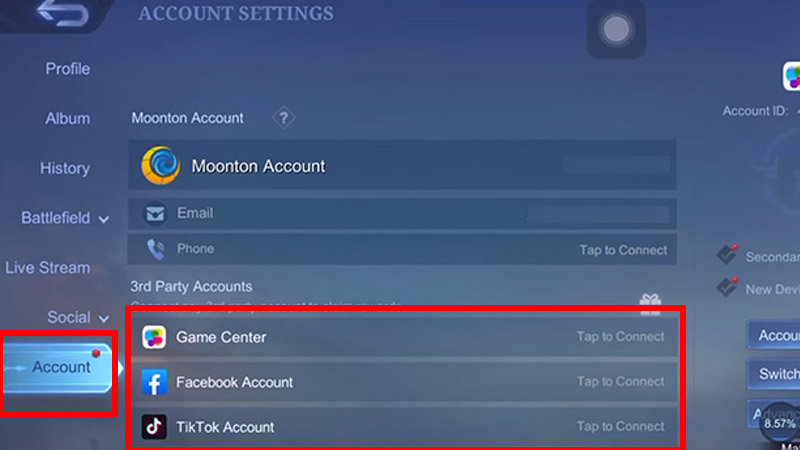
Source Image: Chunshun TV - After that, clear MLBB data & cache. To do so, close MLBB> go to device Settings> Applications> MLBB> Storage & Cache> Clear Data & Cache. (Don’t forget to bind your main account before doing this process or else you may lose your progress.)
- Then, launch the MLBB game and download all the required resources.
- Once done, avoid logging into existing accounts, and you’ll get the Create Character page.
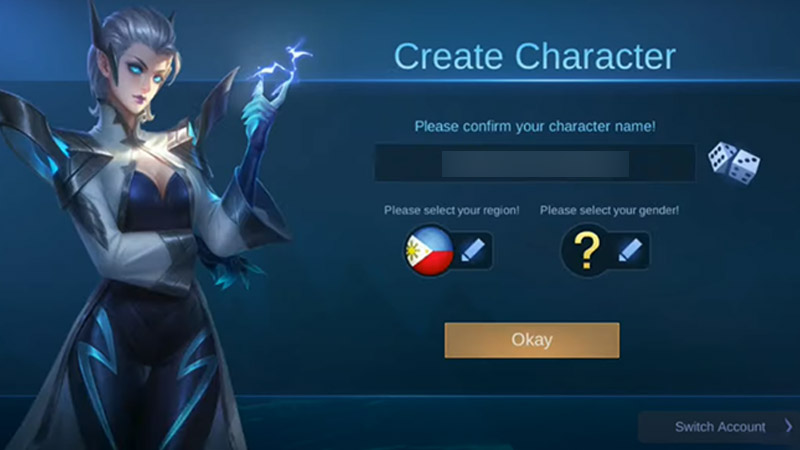
Source Image: Chunshun TV - After that, enter the new account details and go to Profile picture> Account tab again to bind your second MLBB account.
Now that you have a second account you can switch between the old and new accounts anytime you want. Players can make as many accounts as they want but to do that they must have enough social media handles to bind them.
This is all you need to know about how you can create new second account in Mobile Legends Bang Bang (MLBB). If you want to progress quickly in the new account then check out the best ways to Rank Up fast in the game. Also, take a look at the MLBB Redeem Codes Wiki to get free rewards.