
If you’re searching to know about HoloCure Controller Support, you’ve landed in the right place. In this guide, we have explained how you can use a controller to play the game and how to set it up so that you can use it without any hassle. Although it can be played on a PC using a keyboard and a mouse, many gamers are attempting to hook a controller up to play the game conveniently. Read along with this guide to learn more about the same.
Is There a Way to Play HoloCure with Controller Support?
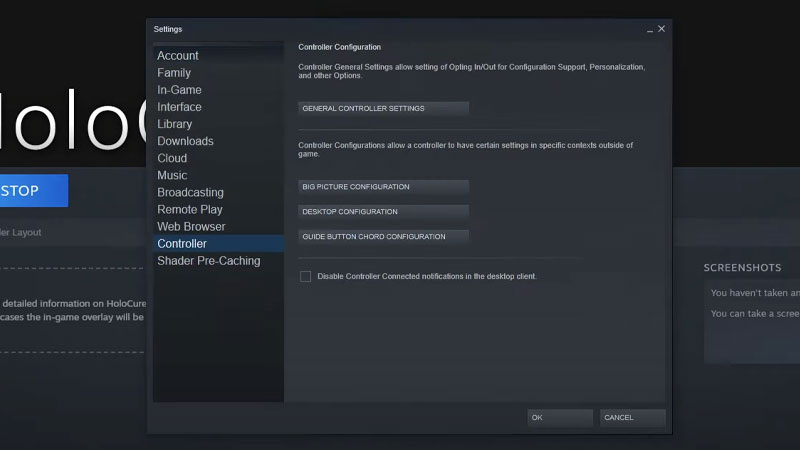
Unfortunately, the Holocure controller support provision hasn’t been added yet. But, if it’s any consolation, there is indeed a way to make it happen. And to begin with, all you need is a Steam account, and a controller, quite naturally.
If you’re not an avid gamer, this may come off as a little challenging to you. Nonetheless, with the help of our guide, you’ll be through in no time. Below, we have mentioned the steps to play Holocure with your controller.
Steps to Set Up Controller on Steam
- Launch Steam on your device and add HoloCure to your Library
- Open the Settings tab
- Click on the Controller menu
- Select General Controller Settings
- Connect your Controller to the PC
- Select the Configuration Support as per your Controller
- Once you’re done, set your preferred layout and save it for future use
- Relaunch the game and play with your controller
This is how you can arrange to play with your controller until the official settings are released.
Will HoloCure have Controller Support?
To answer your query, yes. The developers have verified that they will be introducing controller support for the game in the future. However, for now, you know how to play the game with your controller.
This is all you need to know about Holocure Controller Support. Hopefully, this guide was helpful to you. While you’re here, feel free to browse through other similar articles such as Best PS5 Controllers and Best Xbox Controllers.