
Garena Free Fire is known to introduce new modes, characters, skins, and events into the game. The latest mode that they introduce is ‘Pet Rumble’, which marks the collaboration of Free Fire and Among Us.
There is no denying that Garena has multiple modes to choose from but the developer continues to launch new modes for a limited period of time to keep the millions of gamers entertained. The newly added event or mode, Pet Rumble has already started on May 17th, India and it will run until May 23rd, 2021.
Yes, it would not the permanent mode as Battle Royale and Clash Squad. Ever since it was announced, there are players who have been curious to know about this mode and if that’s you then look no further as we have got you everything covered here.
Free Fire X Among Us
As we have mentioned above, Garena Free Fire has collaborated with a massively popular video game, Among Us to bring Pet Rumble mode into the game. Here’s everything you need to know about the newly added mode.
Werewolf Room Card
There is a new custom room in Free Fire called ‘The Wereworlf’. In order to open it, players will have to spend Diamonds and buy the Werewolf Room card from the store. Notably, each room has the capacity of keeping a maximum number of 6 players.
When you select this mode and start playing it, you will be shocked because the gameplay is entirely similar to Among Us. There will be four Scientists who are busy fixing their laboratory but there are 2 Pranksters who make all possible efforts to kill them. The best thing about this mode is it has a voice chat option allowing players to listen to the voice of all nearby teammates.
Crisis Lab Map
Those who have played Among Us must be aware of the Skeld Map of the game. With the new mode, Garena has introduced a map called ‘The Crisis Lap’, which is the first of its kind in the game.
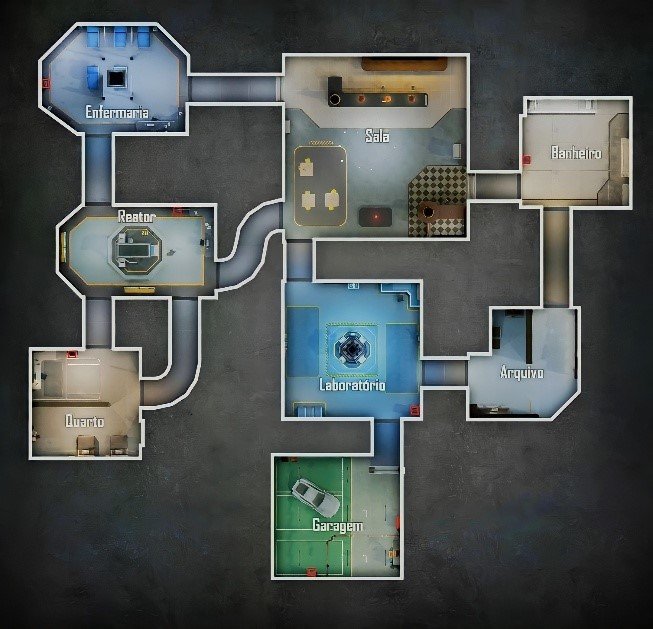
Here are all the main locations of the Crisis Lap map:
- Laboratory
- Crisis Lab
- Cafeteria (Spawn location)
- Armory
- Reactor
- Garage
- Shield
- Security
Free Fire: How To Play Pet Rumble Mode?
Playing Pet Rumble mode in Free Fire is straightforward. What all you need to do is keep in mind that there are two main roles — Scientist and Pranksters. Both roles have different tasks or missions to complete.
Scientists are supposed to discover all Pranksters while Pranksters will have to destroy the library created by Scientists to win.
Spectators
When a player gets killed in Pet Rumble mode, they will have an option to view the entire match. Notably, they would not be able to have a chat with living players. They can only have a talk with dead players.
That’s everything you need to know about Free Fire Pet Rumble mode.