
Playing Epic Seven can be fun at times as there are various features that make you want to explore this game even further. One such feature is repeat battle. Well, do you know how you can increase auto repeat in Epic Seven? If you didn’t, this is the place to be. In this guide, we have covered how you can increase repeat battle in the game. All you have to do is simply follow through with this guide and learn more about the feature.
How to Increase Auto Repeat in Epic Seven?
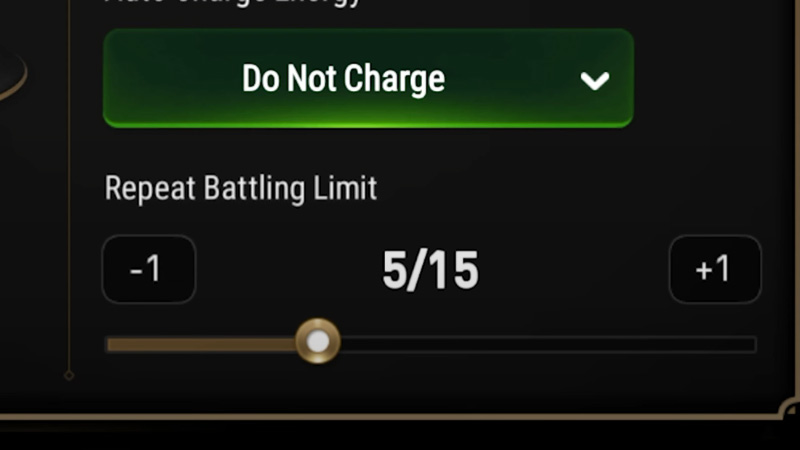
To answer your query, yes, you can increase auto repeat in Epic Seven. But you can only increase or decrease the values within the limit. You can’t change the limit. However, you need to be out of battle in order to do so. A lot of players miss this detail while using the feature. Also, it depends on the stars that your pet holds. For example, if your pet is Generation 3 (3-Star), you will have 15 auto repeats by default, if you have a 4-Star pet, the limit increases to 20.
You can change the number of repeats in the Team Select Lobby before you start the battle. Follow the steps given below to increase the auto repeat in the game.
- Open Epic Seven on your device
- Click on the Adventure button at the bottom-right corner
- Tap on Ready
- Click on Select Team
- Select the Battle Pet
- Use the bar to set the limit as per your choice
- Then start the Battle
Remember that you can’t increase or decrease the auto repeats while in battle. You have to either do it before the battle starts or hold your silence until the battle ends. Another thing to keep in mind is that the repeat battle feature kicks in after you play the first battle. For instance, you’ll have to play the first game and then auto repeat will start from the second game. So, if you keep your limit at 5, the total number of battles fought will be 6.
This is all you need to know about how to increase auto repeat in Epic Seven. Hopefully, this guide was helpful to you. While you’re here, you can go ahead and check out other similar articles such as How to Enable Auto Repeat in Epic Seven? and Best stages to Farm EXP.