
Close Menu
    Facebook X (Twitter) Instagram
    • About Us
    • Contact Us
    • Privacy Policy
    • Disclaimer
    Facebook X (Twitter) Instagram Pinterest Vimeo
    Games Adda
    • Gaming
    • Tips and Tricks
    • Tech
    • Best Buy
      • Gaming Mouse
      • Headphones
      • Laptops
      • Smartphones
      • Smartwatches
    Subscribe
    Games Adda
    Home » Gaming » PUBG New State Add Friends
    Gaming

    How To Add Friends In PUBG New State?

    Mihir HateBy Mihir HateNovember 12, 2021Updated:November 12, 2021No Comments2 Mins Read
    Share Facebook Twitter Pinterest LinkedIn Tumblr Reddit Telegram Email
    PUBG New State Add Friends: How To Play With Friends & Online Players
    Share
    Facebook Twitter LinkedIn Pinterest Email

    Wondering how to add friends in PUBG New State? Well, it is a pretty simple process to work with. In no time you will be playing alongside your buddies and joining them in Battle. Another reason why it’s better to play with friends is that you can blame them for a loss, because obviously. So, scroll down and find out how to add and play with friends in New State.

    How to add and play with Friends in PUBG New State?
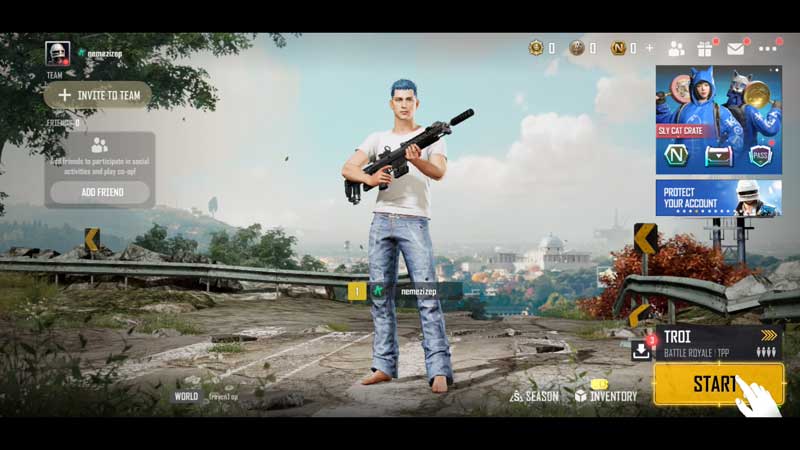
    PUBG New State Add Friends: How To Play With Friends & Online Players

    To add friends and other players, you will have to follow the steps given below:

    • First, look at the top right corner of the screen and you will find the friends icon next to the gift box.
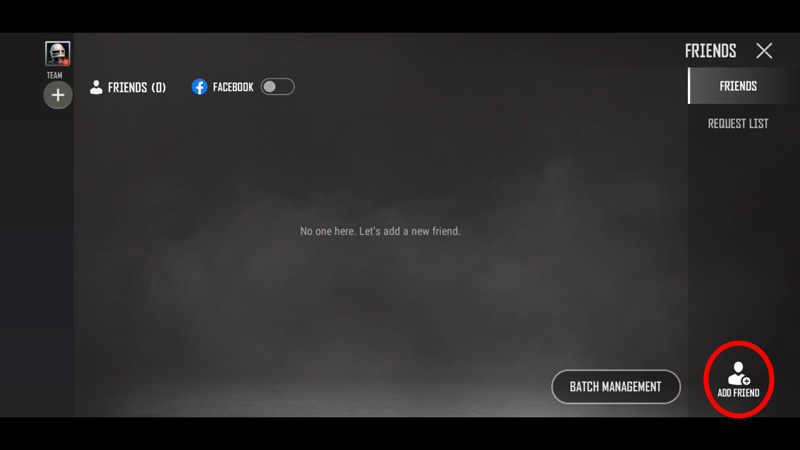
    • Click on this and you will come across a screen with the Friends list. This screen will look like the image below.
    PUBG New State Add Friends: How To Play With Friends & Online Players

    • Now, on the bottom right corner of the screen, click on the add friend button.
    • This will open up another screen with a textbox.
    • Enter in the complete username of the player you want to add.
    • After this, you will get the username in a list on the side.
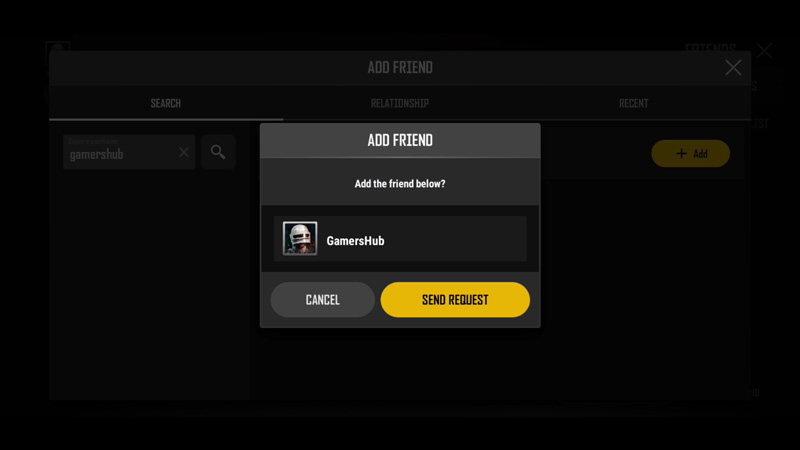
    • Click on the ‘+Add’ button on the username.
    • Once you do this you will get another pop-up.
    • Click on the Send Request button to send the player a request.
    • This is how to add friends in PUBG New State.
    PUBG New State Add Friends: How To Play With Friends & Online Players

    Also Read: PUBG New State Login Error Fix: How To Log Into Game?

    How to invite players to the team?
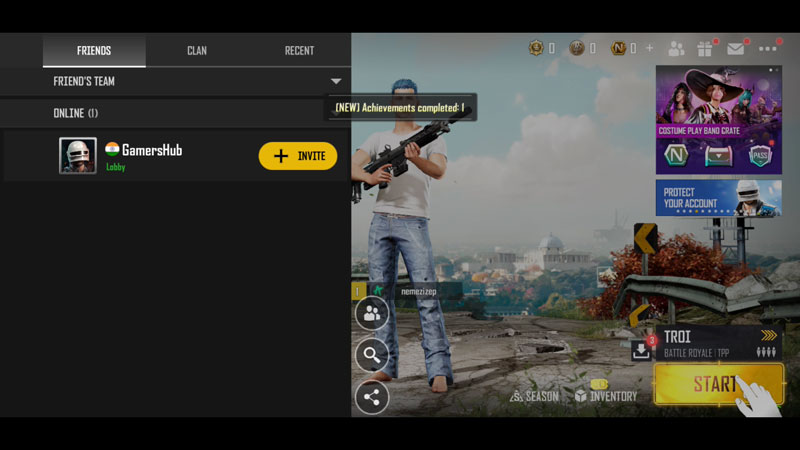
    • Once the player accepts your request, you will have to go back to the main screen.
    • Once you are here, click on the Invite to Team button on the left of the screen.
    • In this list, you will find the username of your friend.
    • Click on Invite and wait for your friend to accept the request.
    • Once they do so, you will be able to play with them.

    This YouTube video will help as a visual guide for the same:

    This is everything that you will need to know about how to add and play with friends in PUBG New State. While you are here, you can also have a look at the 50+ Best, Unique & Stylish PUBG New State Names.

    Mobile Games PUBG New State Guides Tips and Tricks
    Share. Facebook Twitter Pinterest LinkedIn Tumblr Email
    Previous ArticlePUBG New State Name Generators: How To Create Stylish Nicknames?
    Next Article All Free Fire Creators’ Clash Redeem Codes List (2022)
    Mihir Hate
    • Instagram
    • LinkedIn

    Aimlessly roaming around Horizon 5 looking for Barn Finds.

    Related Posts

    Gaming

    From Lockdown Epiphany to India’s First “Phygital” Arcade: The Claw King Story

    August 19, 2025
    Gaming

    The Biggest Esports Tournaments to Watch in 2025

    March 25, 2025
    Gaming

    Experience Elden Ring Like Never Before: Ranni Demigod Backpack Mod

    July 10, 2024
    Add A Comment

    Comments are closed.

    Facebook X (Twitter) Instagram Pinterest
    • About Us
    • Contact Us
    • Privacy Policy
    • Disclaimer
    © 2026 ThemeSphere. Designed by ThemeSphere.

    Type above and press Enter to search. Press Esc to cancel.