
Close Menu
    Facebook X (Twitter) Instagram
    • About Us
    • Contact Us
    • Privacy Policy
    • Disclaimer
    Facebook X (Twitter) Instagram Pinterest Vimeo
    Games Adda
    • Gaming
    • Tips and Tricks
    • Tech
    • Best Buy
      • Gaming Mouse
      • Headphones
      • Laptops
      • Smartphones
      • Smartwatches
    Subscribe
    Games Adda
    Home » Gaming » Brawlhalla Multiplayer Guide: How To Add Friends In Brawlhalla?
    Gaming

    Brawlhalla Multiplayer Guide: How To Add Friends In Brawlhalla?

    Chinmayee HBy Chinmayee HSeptember 6, 2021No Comments2 Mins Read
    Share Facebook Twitter Pinterest LinkedIn Tumblr Reddit Telegram Email
    Brawlhalla Multiplayer Guide
    Share
    Facebook Twitter LinkedIn Pinterest Email

    Brawlhalla is a free-to-play fighting game developed by Blue Mammoth and Ubisoft in 2014. Any game is more fun if you could play it with your friends. There are plenty of people who want to play Brawlhalla with their friends but they don’t know how it is done and if that’s you then look no further as we have you covered.

    How To Play Brawlhalla with Friends?

    To play Brawlhalla with your friends, you will have to follow a few simple steps. To know what these steps are then keep reading this post.

    Here are all the steps to create room and play Brawlhalla with your friends:

    1) Launch the game on your device.

    2) Click on the ” Create GameRoom”  option on the left side of your screen.
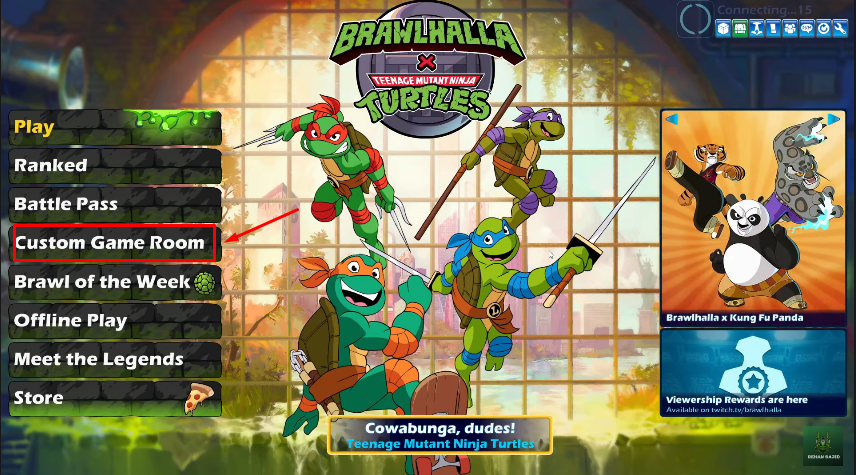
    how to add friends in Brawlhalla

    3) Next, you will get three options — Create Room, Join Room, Browse rooms. Click on the ‘Create Room’ option to play Brawlhalla with your friends.
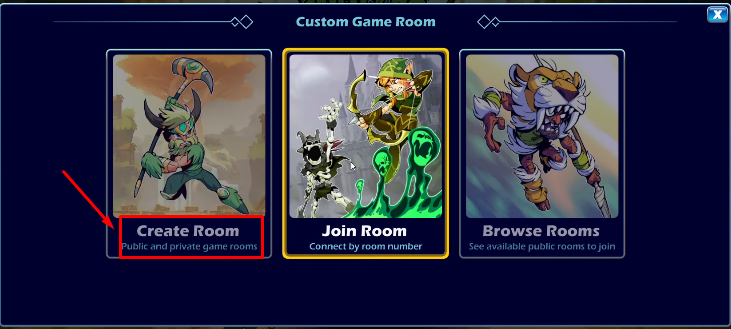
    how to add friends in Brawlhalla

    4) A new window will open again with two options. Click on the ‘Private Room’ option to create a separate room for your friends.
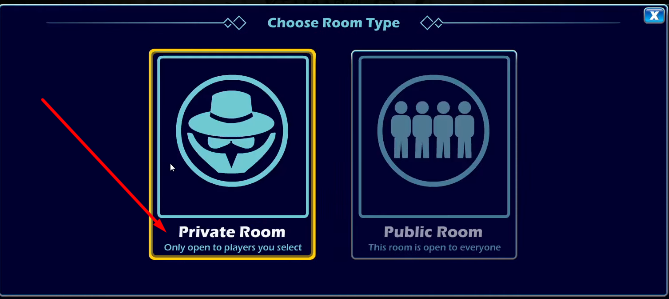
    how to add friends in Brawlhalla

    5) On the top of the screen find settings and click on it.
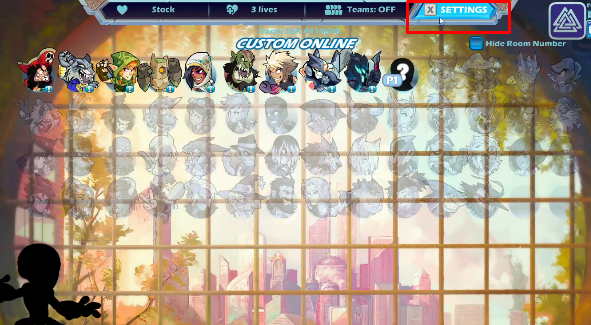
    how to add friends in Brawlhalla

    6) Go to Lobby and get your private room code on the top right corner of your screen. Copy this code and send it to your friends with whom you want to play Brawlhalla via any preferred messenger. Eg. Discord, Facebook, or any!

    Ask your friends to join the room using this code and enjoy your favorite game with your friends!
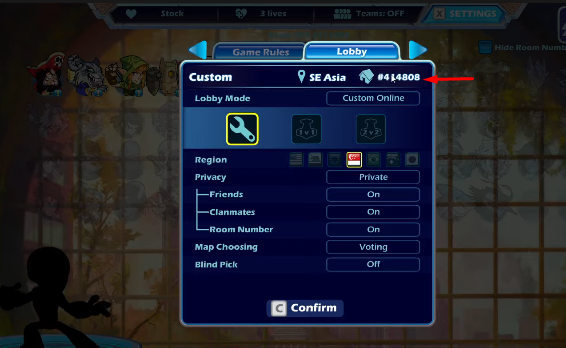
    how to add friends in Brawlhalla

    How To Join Room In Brawlhalla?

    Follow the below mentioned steps to join the room created by your friends:

    1) Launch the game. Go to create room from the left side menu.

    2) Click on the join room.

    3) Enter the private room code shared by your friend.

    4) And it’s done!

    That is everything you need to know about how to play Brawlhalla with your friends. Create a room and enjoy with your friends. For more information read another article on Brawlhalla Ranking System, Tiers, And Ranks.

    Brawlhalla Guides Mobile Games Tips and Tricks
    Share. Facebook Twitter Pinterest LinkedIn Tumblr Email
    Previous ArticleSkyesports Championship BGMI 3.0 Point Table, Rewards & Top Players
    Next Article Brawlhalla: How To Complete The Reversal Signature Quest In 2022?
    Chinmayee H

    Workrate so good you can call me Kante!

    Related Posts

    Gaming

    From Lockdown Epiphany to India’s First “Phygital” Arcade: The Claw King Story

    August 19, 2025
    Gaming

    The Biggest Esports Tournaments to Watch in 2025

    March 25, 2025
    Gaming

    Experience Elden Ring Like Never Before: Ranni Demigod Backpack Mod

    July 10, 2024
    Add A Comment

    Comments are closed.

    Facebook X (Twitter) Instagram Pinterest
    • About Us
    • Contact Us
    • Privacy Policy
    • Disclaimer
    © 2026 ThemeSphere. Designed by ThemeSphere.

    Type above and press Enter to search. Press Esc to cancel.