
Valorant is one of the most popular multiplayer shooter games. As of now and the game has a big fanbase in India as well. Many players purchase in-game items like skins and weapons in Valorant. Recently Valorant removed Paytm as a payment option from the India server. It was the only platform where players could buy Valorant points in INR. Just hours ago Valorant added UPI as a payment method to buy Valorant points. Let’s see how you can buy Valorant points using UPI.
How To Buy Valorant Points Using UPI In 2022?
The process of buying Valorant points remains the same even though the payment gateway is changed. Follow the below-mentioned steps to buy Valorant points.
- Launch Valorant and at the top right you will see a symbol showing how many Valorant points you own.
- Click on the symbol and you will be taken to a page where you can see all the Valorant points packs available.
- Players can select the payment method to see the different packs available for different payment gateways.
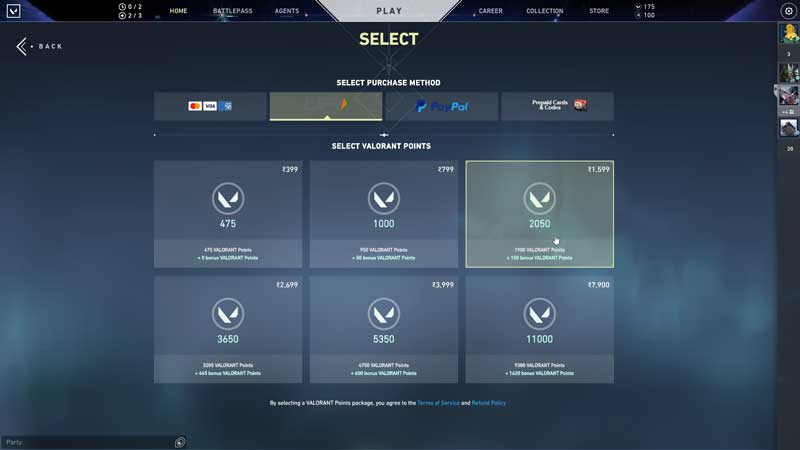
- In case you are using Mastercard or Paypal the pricing will be in Euro where if you are using UPI the pricing will be in INR
- Select UPI, choose the pack you want to buy and you will be taken to a page where you have to enter your UPI ID.
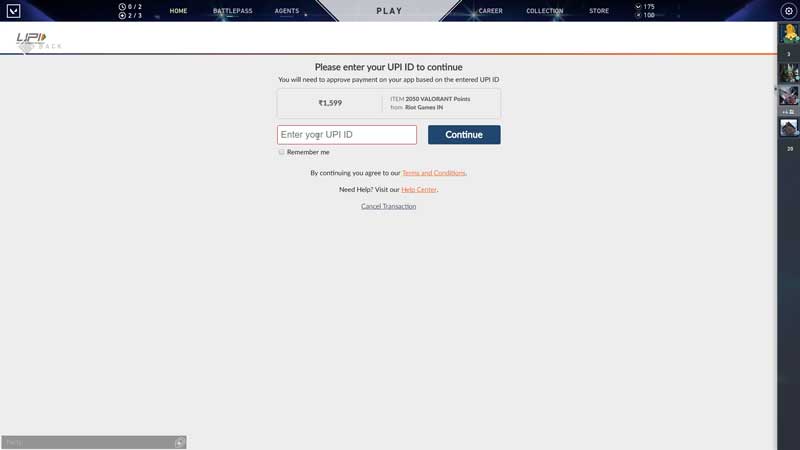
- The process after that is like any other UPI transaction. Just put in your UPI password and the purchase will be completed.
Why Was Paytm Removed From Valorant?
Paytm was the only payment gateway where Indian players could buy Valorant points in INR. Suddenly the Paytm payment gateway was removed. There is no official announcement as to why Paytm was sacked by Valorant. Many believe that Valorant sacked Paytm for UPI because UPI is more popular and makes buying Vaolorant points easier for Indian players. Even though the payment gateway is changed the Valorant point packages remain the same for UPI as well
Why You Should Buy Valorant Points From UPI instead of Other Payment Options?
Players can buy 2050 Valorant points for INR 1600 where if you buy a pack in Euro’s you get 2150 valorant points for INR 2000 (converted). The same is the case with all the INR packs which means you get more Valorant points for cheaper if you buy them using UPI. We would recommend Indian players to buy Valorant points using the UPI option instead of other payment options.
That’s all for this one, do check out our article to know how to buy Valorant points from Codashop.