
Pokemon Unite has many stylish and unique clothes, accessories, and cosmetic items. That you can use to give your Trainer and Pokemon the desired look. At the start of your game, you will get some basic clothing items to choose from, but as you level up you will get many new options. So, if you are a new Trainer and are looking to design your character from scratch, follow this character creation guide for Pokemon Unite.
Character Creation Guide for Pokemon Unite
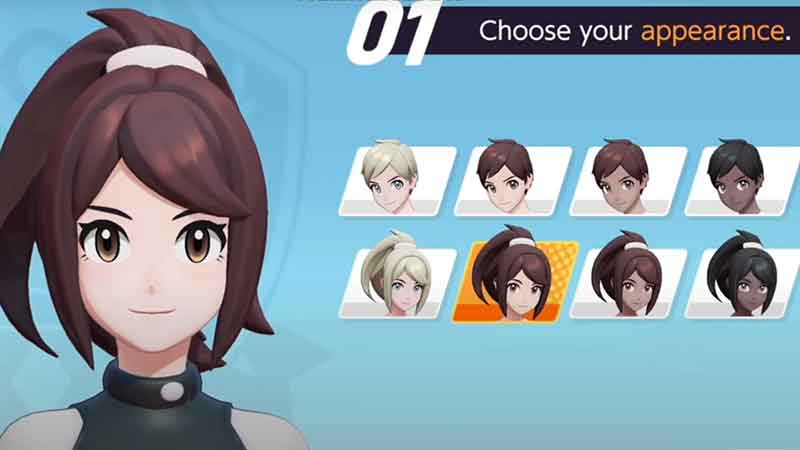
One of the first things that the game asks you to do is create your character. So here are all the steps you need to follow to make a Trainer of your style.
- It will first ask you to choose your appearance. It is the basic appearance that you will customize in the coming steps. It will show you 8 profiles: four boy and four girl appearances.
- All of them have different skin tones, eyes, and hair colors. But this step is for selecting your skin tone.
- Let’s assume you chose the sixth character of a girl with brown eyes and dark brown hair.
- Once you choose your appearance, it will show you a close-up of that character. If you wish to continue with the character. Then hit “Next”.
- Now, you will get to choose your face. There are six options with different eye and eyebrow shapes. Choose one and tap Next.
- The third window is for hairstyle. Choose one and hit Next.
- The fourth window is for hair color.
- In the fifth step, you will be asked to select your fashion. Which is a unit set of orange and purple colors.
- Press Next and a pop-up confirmation window will appear. Tap “OK” to confirm your look.
- Now it will show you your Trainer card with your Trainer name and ID.
In this guide, you learned about character creation in Pokemon Unite. If you found this guide helpful. Check out the list of Berries and the vision guide.