
In DBD the players can experience the thrill of being the Killer and also the Survivor. In DBD the players are trapped in the battlefield and the killer played by the one of the player tries to catch the other Survivors and Torture them. But to survive, the Survivors try to avoid the killers by blinding and stunning him with the Flashlight and fix the Generator in time to escape and win the game/match. Here’s how to use the Flashlight in Dead by Daylight (DBD) Mobile.
Where to Find & How to Use Flashlight in Dead by Daylight Mobile?
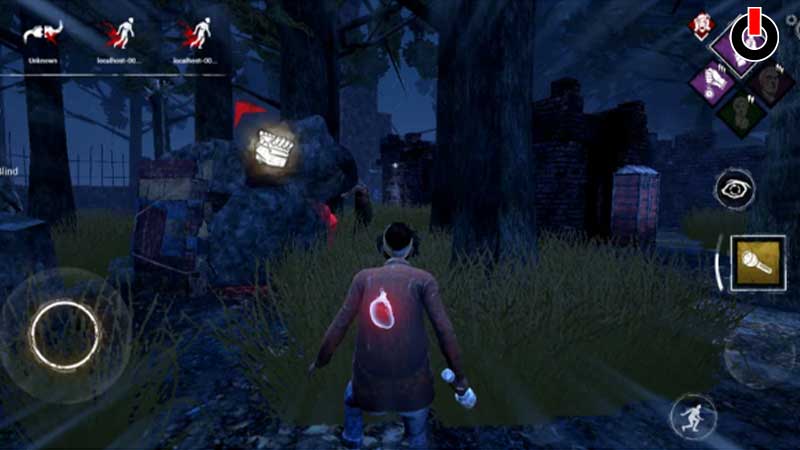
The Flashlight is very crucial because of the limited Battery life and should be only used when necessary. It can be used to blind the killer and also useful for saving one of your Teammate and here’s how you can do it.
- Before starting the game just tap on the loadout icon located on the upper-left side of your screen and equip the flashlight from your loadout into your add-ons, but if you don’t own a flashlight yet, just keep playing and you’ll find one in the Chest during the game or you can just unlock it in the Blood Market by increasing your Bloodpoints.
- After equipping the Flashlight just be aware of the limited Battery life of the flashlight, the Uncommon flashlight only contains 8 seconds of battery life and 2 seconds of per beam duration, you can also unlock the other types of Flashlight with better battery life later on.
- For blinding the killer just tap on the flashlight icon located on the right side of your screen and aim it at the killer eyes from a distance of 10 meters. That’s because the beam of flashlight reaches to 10 meters only, using the flashlight from close range is not useful.
- Even if the killer is blind or stunned for some seconds, he can still move and attack you. Flashlight is also used for saving the survivor by blinding the killer; he will drop the survivors if he is carrying them.
Flashlight can also disable the traps left behind by the Hag and can also burn the wraith and the nurse things when they’re decloaking. For burning things and disabling the trap you just have to shine your flashlight beam at them.
How many types of Flashlights are there in DBD?
There are 3 types of flashlight in DBD:
- Uncommon flashlight – Contains 8 seconds of the battery life.
- Sport flashlight – Contains 8 seconds of battery life, consumes slightly less battery, increases slight accuracy.
- Utility flashlight– Contains 12 seconds of battery life, slightly reduces accuracy, increased beam brightness, increased blindness duration.
This is all you need to know about how to use the flashlight in DBD Mobile and where you can find it. Just keep practicing the aim and you will be able to blind or stun the killer to save the survivor and buy you some time to hide.
As you’re playing as a survivor you might need some luck, so check out our guide related to the luck mechanism on Games Adda.