
PUBG New State has just been released on Android and iOs and there are many players wondering about what is NC currency in the game. NC currency is basically an in-game currency in PUBG New State like UC Currency in BGMI. It can be purchased and can be top up by using real-world money,
Read further to know everything about the NC currency in PUBG New State and get the best deals out of it.
Also Read: PUBG New State Optimization Problem Fix
What Is NC Currency In PUBG New State?
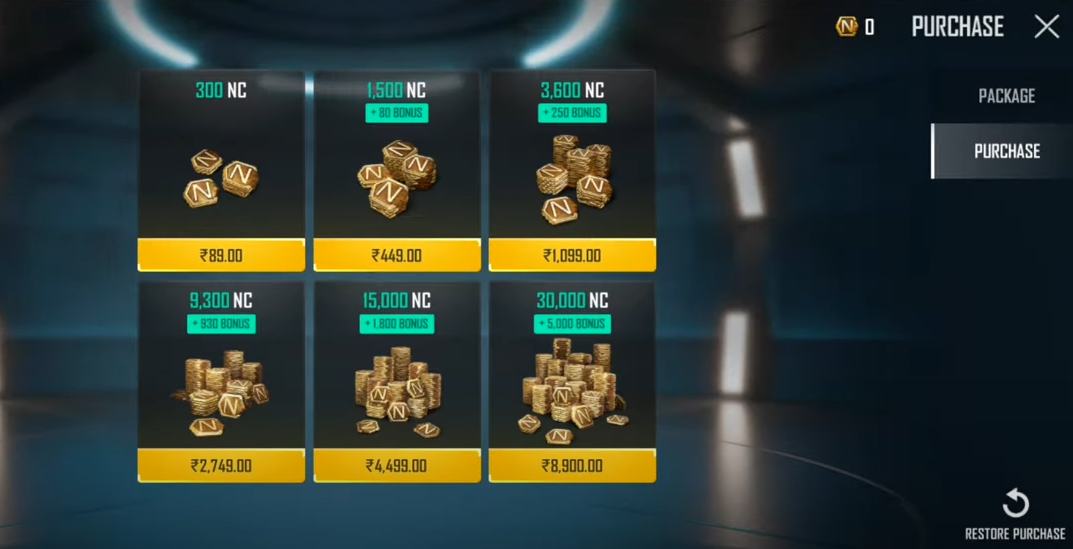
As we mentioned earlier NC currency is an in-game currency in PUBG New State similar to UC currency In BGMI. This currency can be very useful to all the players as it can help you buy all the cash, coins, gifts, and almost everything in the game. All the items in the purchase section of the game can be brought only using NC currency and directly not by real-world money. Therefore all the players first need to convert their money into NC currency to use for all their in-game purchases.
NC currency doesn’t spawn automatically, you need to top up your account to have the required number of NC currency. If you are new in the game and do not know how to top up the NC currency in PUBG New State then we have you covered. Here is a step-wise guide for you to top up the NC currency in the game.
How To Top Up NC Currency In PUBG New State?
This is a very easy process and all you have to do is to follow a few simple steps, make an online payment and it’s done. Check out the steps below to top up your account.
- Launch PUBG New State on your mobile.
- Click on the Start button and head towards the Purchase tab.
- Find all the options and their cost available and click on one of them.
- Next, fill up your card details or choose your preferred UPI and do the payments.
- And all the NC’s that you purchase will be deposited into your account.
This is everything you need to know about what is NC currency and how to do the top-up in PUBG New State.