
Thetan Arena has received an overwhelming response from gamers across the world upon its global launch. There are tons of fans who are currently playing it on their Android, iOS devices and PC. Similar to other games, a lot of Thetan Arena players started playing the game using their guest accounts to explore the first few minutes or hours of the game but they do want to transfer their guest account progress to their Email account.
Also Read | How To Invite Or Play Thetan Arena With Your Friends?
Do you want to link your Thetan Arena link account to your Email? If your answer is YES then look no further as we have got you covered. This guide will explain the entire process of linking your Thetan Arena guest account to your email account in the simplest way possible.
Without any further ado, let’s get started:
How To Link Your Thetan Arena Guest Account To Email?
The process of transferring progress from Guest account to Email is pretty simple in Thetan Arena. However, if you don’t know the process then follow the steps mentioned below:
- Launch the game.
- Click on the Settings icon located on the extreme top right corner of the screen.
- In a new window, you will have to click on the Yellow ‘CONNECT’ button.
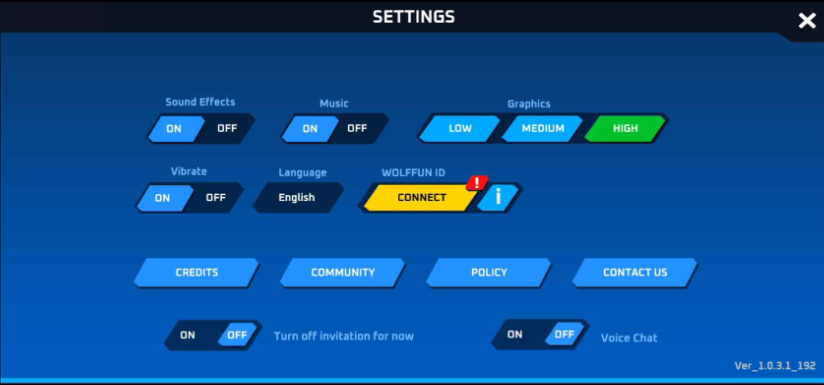
- When you do so, a pop-up window will appear on the screen asking you to enter your Email ID.
- Once entered, click on the ‘SEND CODE’ button.
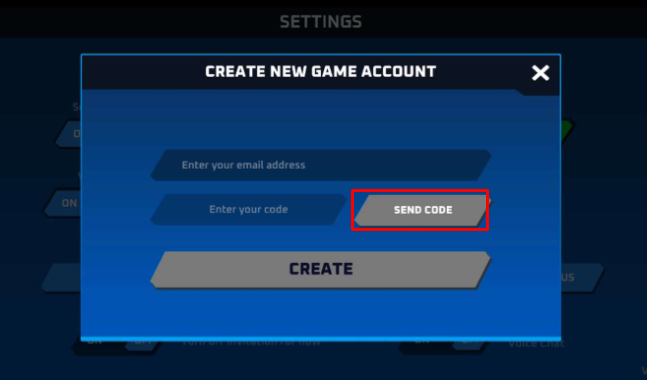
- Now, open your Email ID and copy the code that you have received from Wollfun.
- Enter the 6-digit code into the text box that says ‘Enter your code’
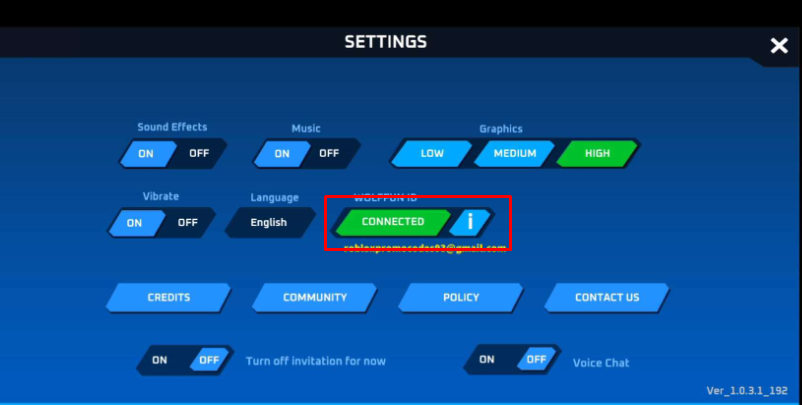
- Once done, click on the ‘CREATE’ button to link your account.
- That’s it.
That’s all you need to know about how to link your guest account to email in Thetan Arean. While you are here, you might like to read how to earn money by playing Thetan Arena.