
BGMI is a widely played battle-royale game in India. When you log in your default region is India. Your matchmaking will be against players in the Indian region. This is visible on the top right side of the Settings page. Currently, the game does not directly allow you to change the server. But you can enable an option that will not restrict your BGMI Matchmaking to India only. This will allow you to test your skills with more players around the globe. It still relies a lot on how the BGMI Matchmaking system works.
With over 16 million daily active users BGMI is not a simple one to crack. It gets tougher as you level up and fight more experienced players. If you had played PUBG before then BGMI is not at all new. With a similar mechanism, the game offers an open-world battle royale mode where you find the beat, other players until the last one is left. If you think you are already a pro in your game it’s time to try out some new regions. Follow these steps below for a detailed in of how to change regions in BGMI?
BGMI: Settings to Change Server and Select a New Region
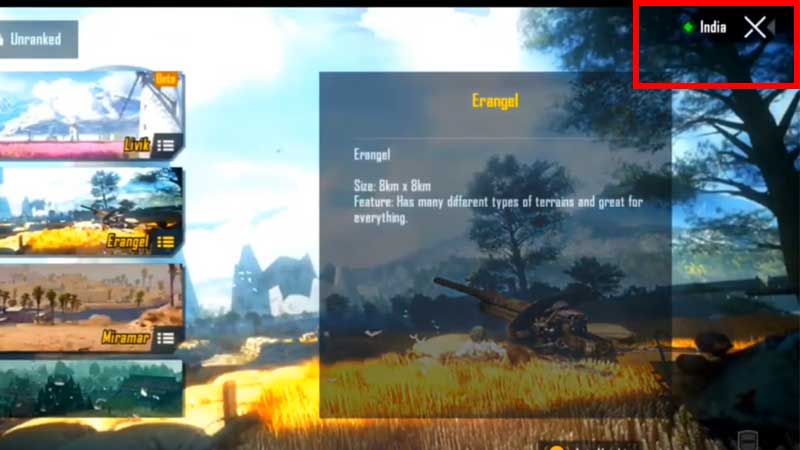
You can pick a new server from the game lobby. Look on the left side under Select Mode. Go to the game lobby and look on the top right side. Tap on India and turn on Drop Tactics. This will put in a league of different players. BGMI does not allow you to directly change a server or pick a region. But you can modify your matchmaking settings with this process. If you are confused about how this really works then keep on reading more about Drop Tactics.
What are Drop Tactics in BGMI?
Drop Tactics was added in BGMi in the update 0.18.0. This is a new option for players to have more competitive matchmaking. Players can pick different styles of tactics that do adjustments in their matchmaking process. If you are playing o the default mode and not happy with the players or squad turn this thing on to change it. Drop Tactics allows players to drop in more crowded areas of the game. There are two settings in this one is Hot Drop and the second is Slow and Steady.
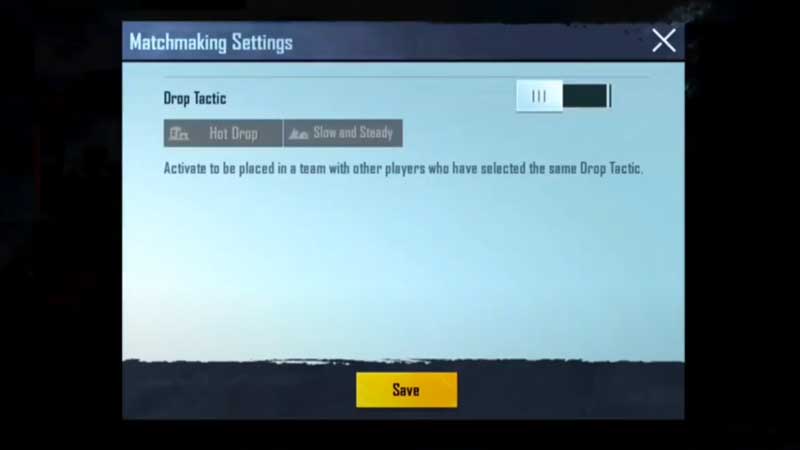
When you pick the Hot Drop section you will be landed among competitive players. They can be from random regions. These settings align players who are looking for more potential drops in the game. The second one is Slow and Steady which is put with players who are less interested in combat. A good way to explore nooks and corners without worrying much about dying. Only the following settings are available that let you switch to a new region. Hope this helps.
We also have troubleshooting tips if you are facing issues with BGMI errors. For example Server Down or Busy error, also do not forget to try out the BGMI 90fps config file that will give you a little boost in the game performance.