
Evony The King’s Return is a real-time strategy online game. The player has to build his clan while maintaining the reign. Apart from that, there are also several puzzles that the player must solve to keep upgrading the various buildings in the kingdom. The best part of this game is that you can Add Friends in Evony.
The benefits of gaining an alliance with the other fellow players help you in a strategy game in many ways. Especially while raiding other kingdoms and defending one’s own. So, in order to Add Friends to the game, you will need to follow the steps mentioned below in this guide. Keep reading further to know more about it.
How to Add Friends in Evony The King’s Return?
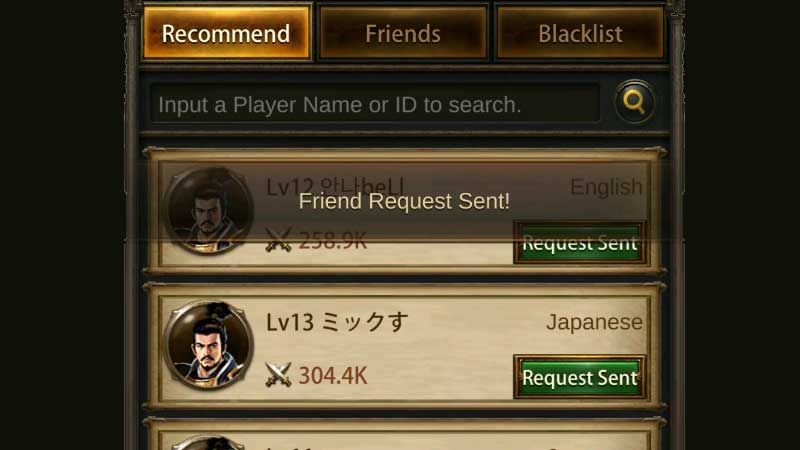
If it is any consolation, the steps to Add Friends in Evony are quite simple. Upon adding fellow players as friends, you can improve your gameplay with their assistance. Below are given the steps to add friends to the game.
- Open Evony on your device
- On the main screen, click on the Menu icon (three horizontal dots) on the right side of the screen
- Click on the Friends tab
- Then click on Recommend
- Insert the Player Name or ID to search fellow players
- Send a Friend Request and wait for them to add you back
And when they accept your request, they’ll become your in-game friends. These are steps through which you can Add Friends in Evony. Meanwhile, go ahead to play the game and add as many friends as you want. Also, if you want to see the list of friends you have added, you can click on the Friends button, right next to Recommend. Hopefully, this guide was helpful to you. While you’re here, you can feel free to check out other similar articles such as Evony 24 Hour Bubbles Not Working Fix and Best RTS Games to play on Mobile.