
Pokemon Unite is a MOBA game and a different gameplay as compared to earlier Pokemon games. As it has a new play style, players have to get familiar with the game. Hence, the developers have provided a practice area in the game. If you’re searching to learn how to use training mode in Pokemon Unite, you’ve landed in the right place. In this guide, we have covered the steps to navigate to the practice area. You simply have to follow this guide and you will learn everything in no time.
How to Use Training Mode in Pokemon Unite?
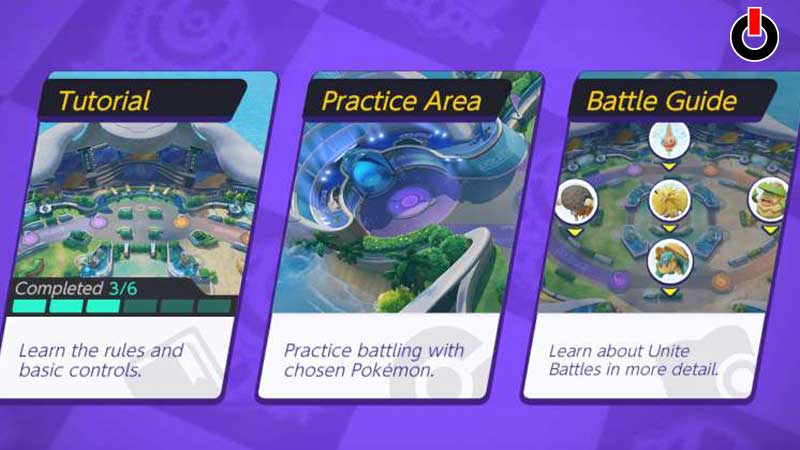
There are various Pokemon in the game and each of them is assigned a certain role to play in the battle. And each role has a different play style from the rest of the roles. So, to get familiar with different play styles you can use training mode in Pokemon Unite. Below, we have mentioned the steps to navigate your way to the practice area.
- Open Pokemon Unite on your device
- On the main screen, click on your Profile in the top-left corner of the screen
- Scroll down the left side area of the Profile menu
- Click on the Practice tab
- Select Practice Area
This is how you can find the practice area in Pokemon Unite. Once, you enter the practice area, you have to choose two Pokemon. The Pokemon to play with and the Opponent Pokemon as well. In this mode, you have to liberty to try every Pokemon in the game. It doesn’t matter if you have the Unite License of a certain Pokemon.
Once, you’ve selected both Pokemon, you have to click on the Start button to start the training. The training battles will basically be a simulator of the real-mode battles. So, you can practice for your next battle in the practice area.
This is all you need to know about how to use training mode in Pokemon Unite. Hopefully, this guide was helpful to you. While you’re here, you can go ahead and browse through other similar articles such as Ranked Match Guide in Pokemon Unite and Can Players Use the same Pokemon?