
Discord is one of the most popular platforms among all gamers. It is the most customizable VoIP with amazing features. You can call, text, listen to music and do many more things with all your friends on Discord. Like any other application, Discord users are also facing some issues on it. So, this error occurs when the user tries to call someone and it does not connect and gets disconnected.
You will see the “RTC Connecting” message on the left bottom of your screen above the name of the person you are calling. If you are also facing the same issue on Discord then here is a quick guide for you!
Check out the steps mentioned in the guide below to fix the “RTC Connecting” issue on Discord.
Discord RTC Connecting Error – What Is It & How To Fix It?
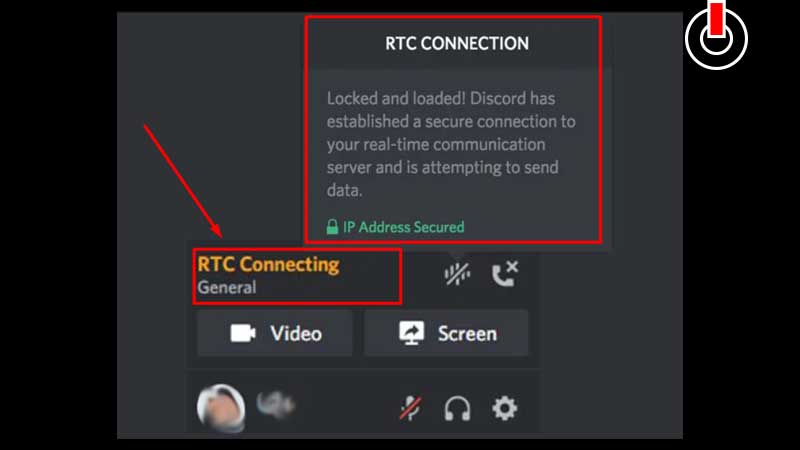
Errors and issues on any application or site can be very annoying especially when you are desperately trying to reach someone. RTC Connecting issue on Discord is also an issue that pops up when you try to call another user. This is one of the most common network errors on Discord caused by a poor internet connection or if you are unable to reach the server.
But, do not worry as it can be fixed with a few easy simple steps. here are all the ways to fix this error from your end.
- Restart Your Router- Before you jump into any advanced settings let’s try this basic and easiest fix first. Just switch the power supply of your Wi-Fi off for a minute or two and switch it on again. Connect your device to your Wi-Fi and see if the issue is fixed.
- Try Using Browser- If you are facing issues with the application then try and use Discord on any browser on your device.
- Use Different Browser- If you are facing issues on the browser then log in from any other browser and see if the issue is fixed.
- Clear Browsing Data & Cache- If the above solution does not work, clear all your browsing data and cache by following a few simple steps.
(Three Dot Icon >> More Tools >> Clear Browsing Data) - Flush DNS- Flush DNS to refresh all your internet settings and fix all the bugs.
(Start >> Type ‘cmd’ >> Press Enter Button >> Type “ipconfig/flushdns” >> Hit Enter button again) - Disable Antivirus- There is a chance that antivirus installed on your system may create hurdles in your way. To avoid that, disable the antivirus temporarily and see if it fix the issue.
This is all you need to know to fix the ‘RTC Connecting’ issue on Discord. Check out another article on what are Discord Easter Eggs and how to find them.