
Close Menu
    Facebook X (Twitter) Instagram
    • About Us
    • Contact Us
    • Privacy Policy
    • Disclaimer
    Facebook X (Twitter) Instagram Pinterest Vimeo
    Games Adda
    • Gaming
    • Tips and Tricks
    • Tech
    • Best Buy
      • Gaming Mouse
      • Headphones
      • Laptops
      • Smartphones
      • Smartwatches
    Subscribe
    Games Adda
    Home » Tech » How To Change Primary Bank Account In PhonePe?
    Tech

    How To Change Primary Bank Account In PhonePe?

    Chinmayee HBy Chinmayee HOctober 21, 2021No Comments2 Mins Read
    Share Facebook Twitter Pinterest LinkedIn Tumblr Reddit Telegram Email
    how to change primary account in PhonePe
    Share
    Facebook Twitter LinkedIn Pinterest Email

    PhonePe is a one-stop solution for all your online bill payments, recharges, and day-to-day transactions. There are several apps available on the app store like Google Pay, Paytm, etc but Phonepe has become one of the most popular apps in a very short period of time. You can add as many bank accounts as you want into your PhonePe app for ease of transaction.

    When you add more than one bank account to your PhonePe, the app automatically sets the first account as your primary account. This will make it a little difficult for you if you wish to make payment through another account.

    So if you want to change your primary account on PhonePe then check the steps given below and enjoy online payment in just a few clicks!

    Steps To Change Primary Account On PhonePe:

    Here are all steps to change your Primary account on PhonePe. Follow all steps carefully as you will be making changes to your Bank Account details.

    1) Open the PhonePe App on your Mobile.

    2) Click on the profile icon on the top left corner of your screen.
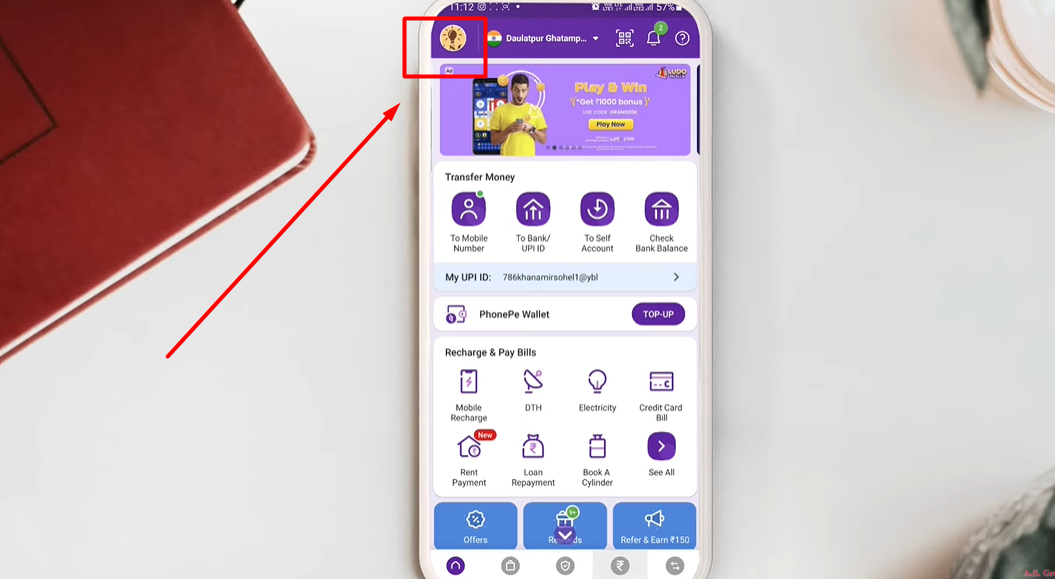
    3) Here you will see all your accounts that you have linked to PhonePe so far.

    4) Click on any one card or bank account that you want to set as your primary account.
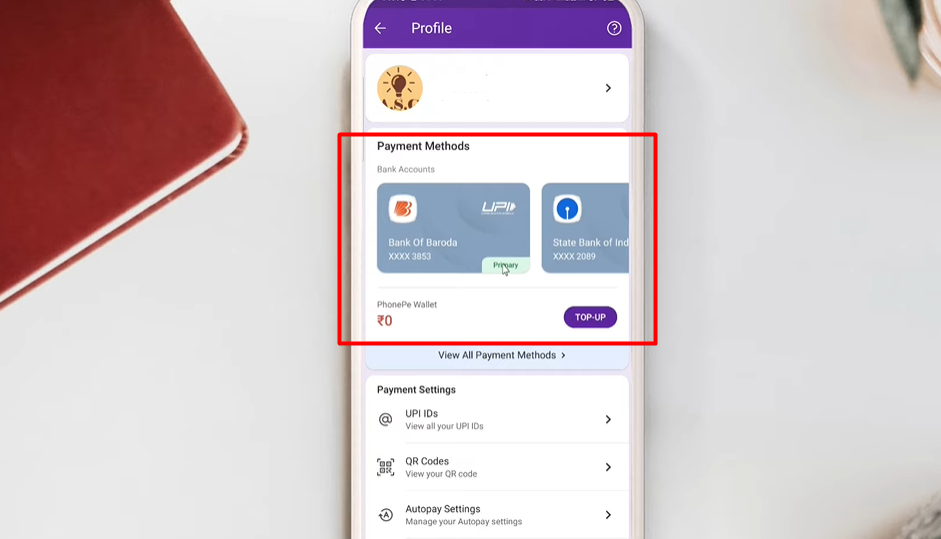
    how to change primary account in PhonePe

    5) Find a small checkbox below your card that says “Set this account as primary account”.
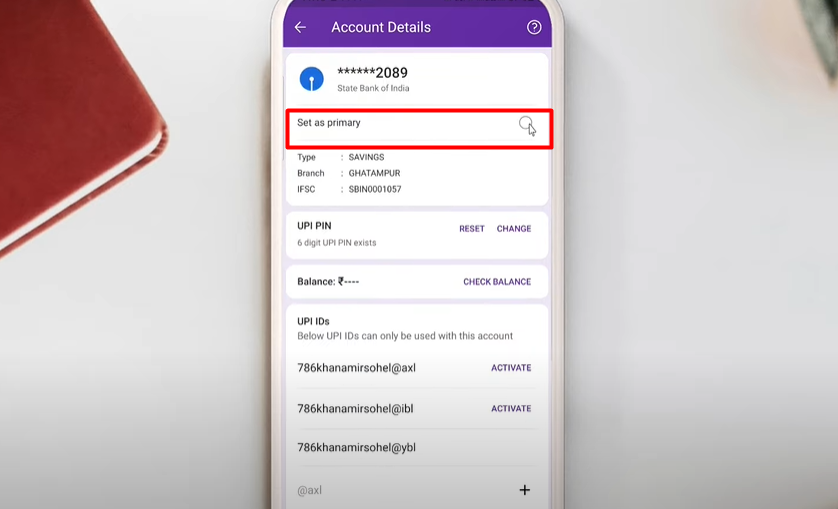
    how to change primary account in PhonePe

    6) Click on the small don’t next to it and hit the ‘Confirm’ Button to set it as your primary account.

    7) And it’s done! Now this will be your primary account for all your future transactions. You can follow the same steps in case you change your mind and you want to set any other account f yours as a primary account.

    This is everything you need to know about how o change the primary bank account in PhonePe. Check out another article to know what is VPA on GPay and how to change it.

    PhonePe Guide
    Share. Facebook Twitter Pinterest LinkedIn Tumblr Email
    Previous ArticleFind the Location of Energy MIR4 Quest: How To Complete It & Get Rewards
    Next Article Genshin Impact: Sayu’s Best Weapons, Attack, Artifacts And More
    Chinmayee H

    Workrate so good you can call me Kante!

    Related Posts

    Apps

    How To Fix Reddit Is Fun (RIF) 403 Forbidden Error

    August 3, 2023
    Tech

    How To Download & Install Google Play Store App On Laptop Or PC

    July 31, 2023
    Best Buy

    Best OnePlus Phones With Fingerprint Sensor Feature (2024)

    May 3, 2024
    Add A Comment

    Comments are closed.

    Facebook X (Twitter) Instagram Pinterest
    • About Us
    • Contact Us
    • Privacy Policy
    • Disclaimer
    © 2026 ThemeSphere. Designed by ThemeSphere.

    Type above and press Enter to search. Press Esc to cancel.