
Riot ID is something that is now used for multiple games developed by Riot like Valorant, Legends of Runeterra, Teamfight Tactics, Wild Rift, etc. Recently, Riot enabled the option to keep your summoners ID and move it to your Riot ID but with a # in the end. The Riot ID is now used for all Riot games. Here is a guide on how to change your Riot ID.
If you do not like the ID name that you just moved over from Summoners rift to Riot ID or if you just want to have one common game name for all games, you can always update your Riot ID. As a new player, I also have been confused about how to change the Riot ID and have done a lot of research. Therefore, I hope this guide helps you and serves your purpose of changing the Riot ID.
How To Change Riot ID & Username – Valorant, League of Legends & More
Follow the steps below to update your Riot ID and Username:
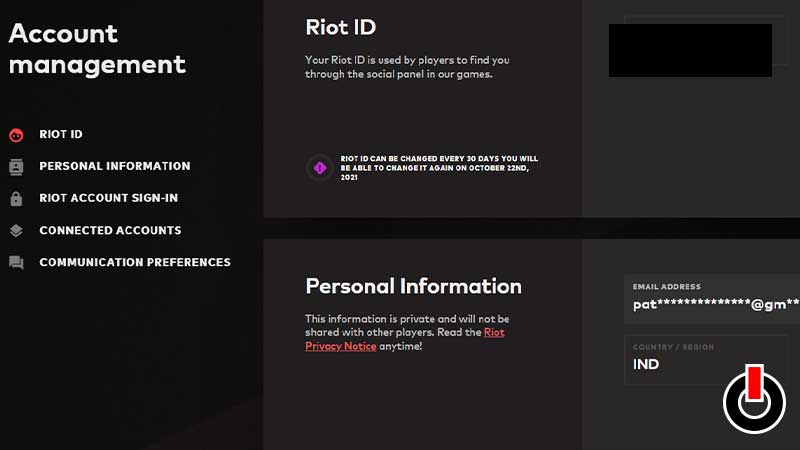
- Go to the Riot Account login page and you will see a Sign In box.
- Sign in using your current username and password.
- It will ask you for a code via your registered email. This is two-factor authentication. Enter the code you got sent.
- Once logged in, you can see Riot ID, click on it.
- You’ll see the option to edit your Riot ID and Username and then Save it.
- Go through your connected accounts to also set them up.
You can only change your Riot ID & Username once in 30 days. If you have recently changed your username, it will not allow you to edit anything. It also shows when you will be able to change your Riot ID under the Riot ID section on the website. You can also change your Tagline which is the #hashtag 4 letters or numbers at the end of the username. This can also be changed every 30 days. Here is how you can check how much money you’ve sent on Valorant so far.