
Close Menu
    Facebook X (Twitter) Instagram
    • About Us
    • Contact Us
    • Privacy Policy
    • Disclaimer
    Facebook X (Twitter) Instagram Pinterest Vimeo
    Games Adda
    • Gaming
    • Tips and Tricks
    • Tech
    • Best Buy
      • Gaming Mouse
      • Headphones
      • Laptops
      • Smartphones
      • Smartwatches
    Subscribe
    Games Adda
    Home » Gaming » Saints Row 3 Remastered: How to Unlock Frame Rate?
    Gaming

    Saints Row 3 Remastered: How to Unlock Frame Rate?

    Chinmayee HBy Chinmayee HAugust 30, 2021No Comments2 Mins Read
    Share Facebook Twitter Pinterest LinkedIn Tumblr Reddit Telegram Email
    Share
    Facebook Twitter LinkedIn Pinterest Email

    Saints Row 3 Remastered is an action-adventure game released in 2011. The latest update of Saints Row allows users to change their FPS settings for better graphics and a better experience. Wondering how to unlock Frame rate or FPS settings (Frames Per Seconds) in Saints Row 3 Remastered? Well, we have created a guide explaining the same in the easiest way possible.

    How to Unlock FPS in Saints Row 3 Remastered?
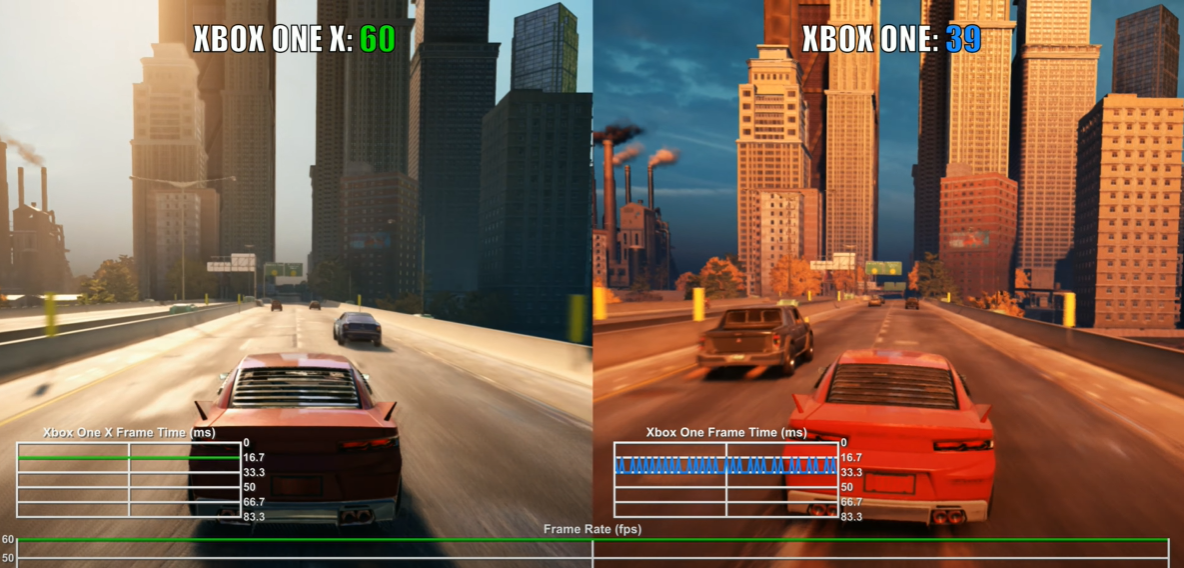
    Saints Row 3 Remastered: How to Unlock Frame Rate?
    Source: VG Tech

    Saints Row 3 Remastered allows the console owners to change their FPS settings. The game usually runs at 30 Frames Per Second. Once frame rate unlocked, you can run it up to 60 FPS on your console. It might lag a bit during firing and blasts when it’s run on higher resolution. But otherwise, it will run very smoothly on 60 FPS giving you the best experience in Saints Row 3 Remastered.

    Steps to unlock FPS settings on your console

    1. Launch the game on your console.
    2. Start the game, if you find the FPS low and want to change it then pause the game.
    3. Click on Option Menu.
    4. Look for the Display option and click on it.
    5. In a new list of options, find the FPS Lock option.
    6. If FPS is set to Yes then turn it off.
    7. That’s it.

    Unlocking FPS option will let you run your Saints Row 3 Remastered at around 60 FPS. But do it at your own risk as it may damage your system. The same settings are available for Play Station 4, Play Station 4 Pro, Xbox One, Xbox Series. Follow the same steps and change them on your console.

    That is everything you need to know about how to unlock the frame rate in Saints Row 3 Remastered. Read another article on how to fix the Saints Row 3 Remastered co-op not working error.

    Saints Row: The Third Remastered
    Share. Facebook Twitter Pinterest LinkedIn Tumblr Email
    Previous ArticleHow To Fix Error While Updating Worn Items On Roblox
    Next Article Best Rocket League Camera Settings (November 2022)
    Chinmayee H

    Workrate so good you can call me Kante!

    Related Posts

    Gaming

    From Lockdown Epiphany to India’s First “Phygital” Arcade: The Claw King Story

    August 19, 2025
    Gaming

    The Biggest Esports Tournaments to Watch in 2025

    March 25, 2025
    Gaming

    Experience Elden Ring Like Never Before: Ranni Demigod Backpack Mod

    July 10, 2024
    Add A Comment

    Comments are closed.

    Facebook X (Twitter) Instagram Pinterest
    • About Us
    • Contact Us
    • Privacy Policy
    • Disclaimer
    © 2026 ThemeSphere. Designed by ThemeSphere.

    Type above and press Enter to search. Press Esc to cancel.