
Close Menu
    Facebook X (Twitter) Instagram
    • About Us
    • Contact Us
    • Privacy Policy
    • Disclaimer
    Facebook X (Twitter) Instagram Pinterest Vimeo
    Games Adda
    • Gaming
    • Tips and Tricks
    • Tech
    • Best Buy
      • Gaming Mouse
      • Headphones
      • Laptops
      • Smartphones
      • Smartwatches
    Subscribe
    Games Adda
    Home » Esports » Battlegrounds Mobile India » BGMI Stylish Names Guide
    Battlegrounds Mobile India

    How To Make Stylish BGMI Names With Unique Fonts And Symbols?

    Omair IqbalBy Omair IqbalJuly 27, 2021No Comments3 Mins Read
    Share Facebook Twitter Pinterest LinkedIn Tumblr Reddit Telegram Email
    BGMI Stylish Name With Unique Symbols
    Share
    Facebook Twitter LinkedIn Pinterest Email

    Every gamer knows the importance of having an attractive and stylish name, Battlegrounds Mobile India (BGMI) fans are no different. Before we explain the process of changing names in BGMI, let me tell you that you would not be able to change it without Rename Card.

    The reason why tons of BGMI fans want to change their name is it is a name that describes their gaming style and persona. Plenty of BGMI players want to keep their name as stylish as Scout, Mortal, Jonathan and, other popular streamers and if that’s you then look no further as we have got your back.

    While many want to keep their BGMI name is unique and entirely different from the rest of the players. Irrespective of what kind of name you want to keep in BGMI, this post will teach you how to add symbols and unique fonts to your name in the game.

    BGMI: How To Make Stylish Names With Unique Fonts And Symbols

    As we have already mentioned above, you will need a rename card to get your name changed in BGMI. For the unversed, Krafton is providing a couple of Rename Cards for transferring data from Global PUBG Mobile to BGMI.
    If you have already used Rename cards that you got for free, you can buy it by spending 180 UC. The best thing about Rename cards is you can collect it as many as you want in your inventory.
    Once you have obtained a rename card, follow the steps mentioned below to change your BGMI name:
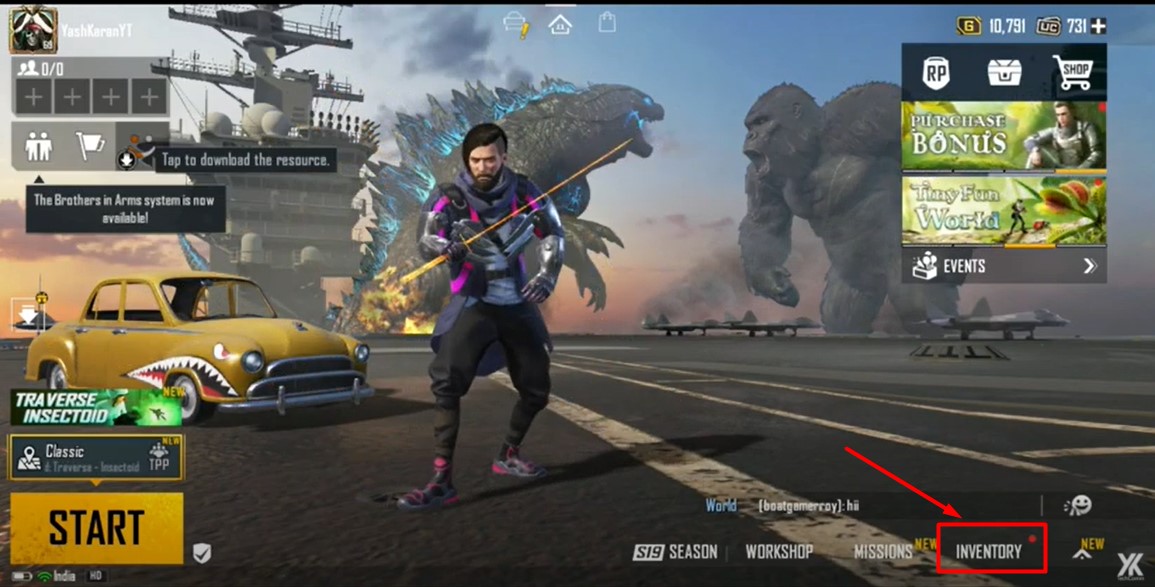
    • First, launch Battlegrounds Mobile India (BGMI) on your phone.
    BGMI Name Change Guide

    • Tap on the Inventory option, located on the bottom right side of the screen.
    BGMI Name Change Guide

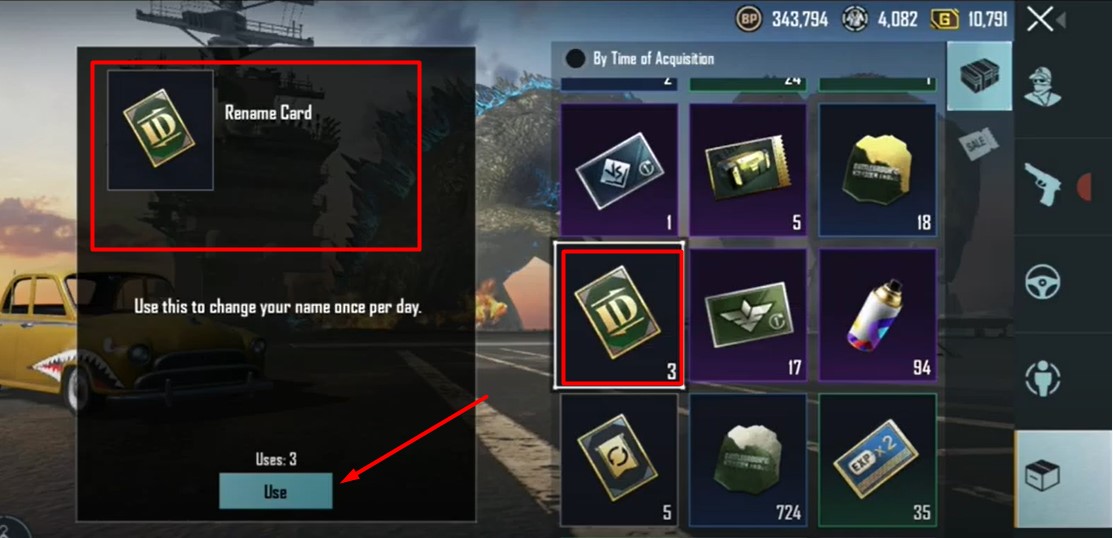
    • In a window that appears on the screen, locate the Rename Card.
    • Once found, tap on the ‘Use’ button as shown in the above picture.
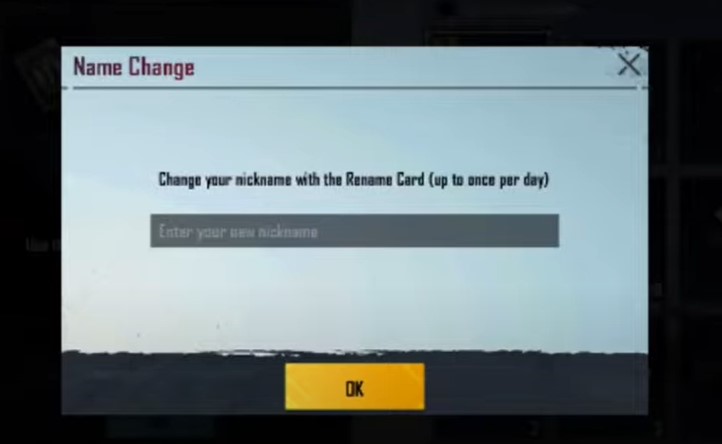
    • Now, you will have to enter the stylish name that you want to keep as your BGMI username or IGN. After entering the name, tap on the OK button.
    Change BGMI Stylish Name

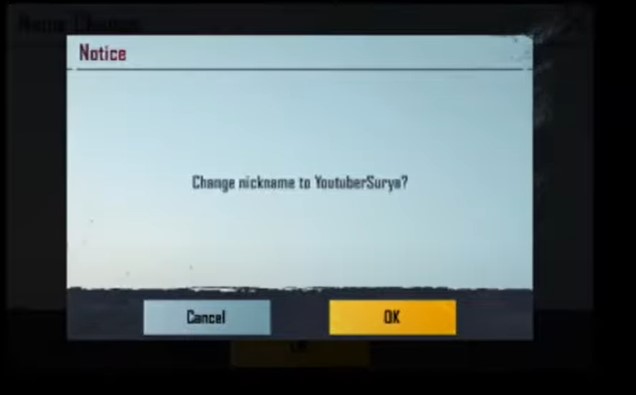
    •  When you tap on it, a new window will appear on the screen confirming you change the BGMI name.
    • If you are sure, click on the Ok button.

    If you are having difficulty creating stylish BGMI names with unique characters and fonts then don’t worry, we have brought to you a list of websites that you can use for the same purpose.

    Here’s the list of websites where you can create stylish BGMI names with unique fonts and symbols.

    • Nickfinder
    • Lingojam
    • Fortnite. freefire-name

    If you don’t know how to use these websites to make stylish and unique BGMI names then click on this link.

    Battlegrounds Mobile India Guides BGMI Guides Mobile Games Tips and Tricks
    Share. Facebook Twitter Pinterest LinkedIn Tumblr Email
    Previous ArticleSplitgate: Release Date, Expected Time, and Battle Pass Details
    Next Article This Is Why YTS.MX Is Not Working?
    Omair Iqbal
    • X (Twitter)

    Related Posts

    Gaming

    From Lockdown Epiphany to India’s First “Phygital” Arcade: The Claw King Story

    August 19, 2025
    Gaming

    The Biggest Esports Tournaments to Watch in 2025

    March 25, 2025
    Gaming

    Experience Elden Ring Like Never Before: Ranni Demigod Backpack Mod

    July 10, 2024
    Add A Comment

    Comments are closed.

    Facebook X (Twitter) Instagram Pinterest
    • About Us
    • Contact Us
    • Privacy Policy
    • Disclaimer
    © 2026 ThemeSphere. Designed by ThemeSphere.

    Type above and press Enter to search. Press Esc to cancel.