
Facebook is a leading social media platform that used people from all age groups. People use this platform to share their photos, videos, and to communicate with the community worldwide. Recently Facebook has launched a new feature that can help you to lock your profile and keep it private from stalkers.
On every social media platform, it is very important to have proper privacy settings to keep your private life hidden from unwanted people. So if you want to hide your profile or lock your Facebook profile then here is a guide for you.
Way To Lock Your Profile On Facebook
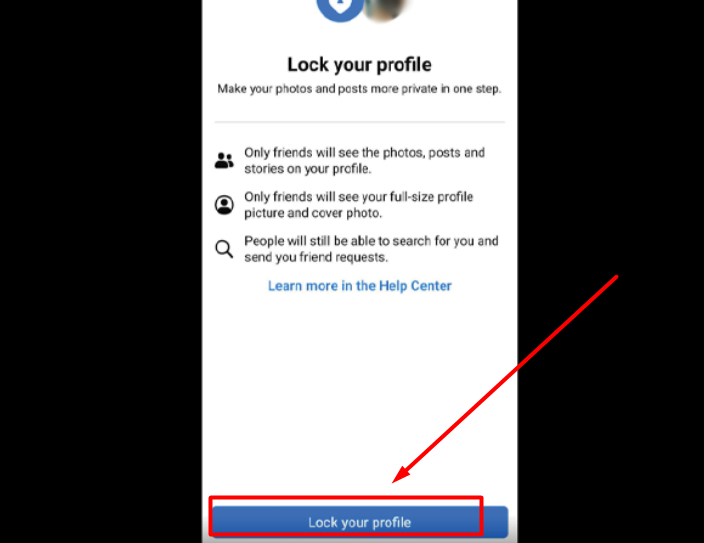
Before you could lock your profile on Facebook there was a settings option under privacy that used to let us select who can see your profile. There were several options like who can see your posts, who can send you messages, or who all can even find you on Facebook. There were three options Viz. Only me, Friends, and everyone.
But the recent update on Facebook has made this process shorter by simply introducing the lock facebook profile feature. It is way simpler than you can ever think. All you have to do is open the Facebook app on your mobile and click on the three dots on the top right corner of your screen.
Next, click on your name and open your profile page and find the “Lock Your Profile” option below your profile photo and click on it. A new window will appear, find the “Lock your profile” button in blue color at the bottom of your screen and click on it. And it’s done!
Now your profile is locked successfully and only your friends will be able to see any posts or images uploaded by you. This was the easiest way to do it. you can also do this from settings. Go to settings and search lock your profile and follow the same steps to lock your Facebook profile.
This is everything you need to know about how to lock your Facebook profile.