
Wondering how to fix the Instagram music search not working issue? If your answer is YES then don’t worry, we have a solution to your problem. You are not alone there are tons of users who are currently having an issue finding music features on Instagram, restricting them to add music on their IG Story in 2023.
How To Fix Instagram Music Not Working Issue In 2023?
If you want to fix your Instagram music search not working issue right now then you will have to follow a few simple steps that we have mentioned below. Once you go through our step-by-step guide, you will be able to add music to your Instagram story.:
- Go to Google Play Store or Apple App Store and update your Instagram app.
- Once updated, sign out and sign in again to see if the feature is working.
- If the music feature is still not working then uninstall and reinstall the app.
- Once installed, launch it and go to the Settings option.
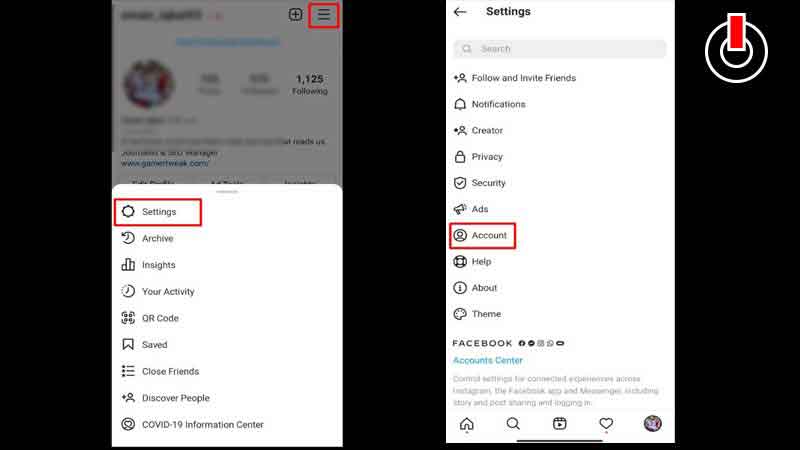
- There, you will need to tap on the Account option.
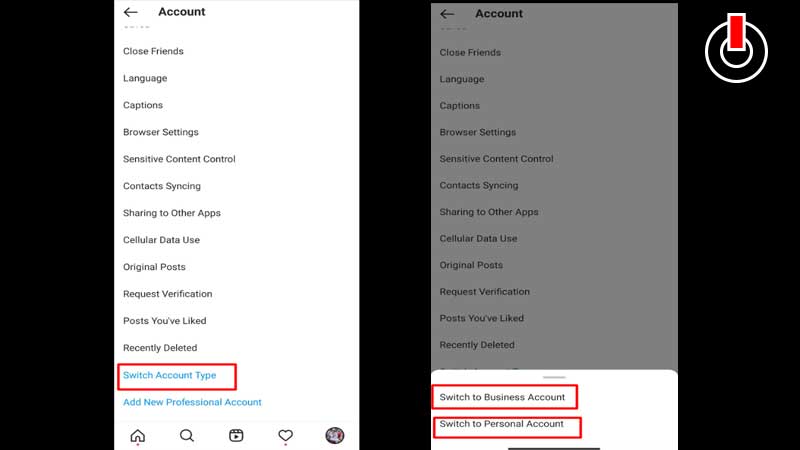
- Now, scroll down and tap on ‘Switch Account Type’
- When you do this, you will get two options ‘Switch to Business Account‘ or ‘Switch to Personal Account’.
- Switch to any of them.
- Once switched, go back to the Instagram Stories option and see if the music feature is working or not.
- That’s it.
Once you have successfully resolved the Instagram music not working issue, you can put your favorite music or song on your Instagram stories. There are many who still don’t know how to add songs to Instagram stories and if that’s you then look no further as we have got you covered.
How To Add Music To Instagram Stories?
It is pretty simple to add music or song to Instagram stories. However, if you don’t know how it is done then don’t worry, we have a step-by-step guide explaining the same in the easiest way possible.
- Open Instagram and select the story where you want to add music.
- Once selected, tap on the Sticker icon shown in the below picture.
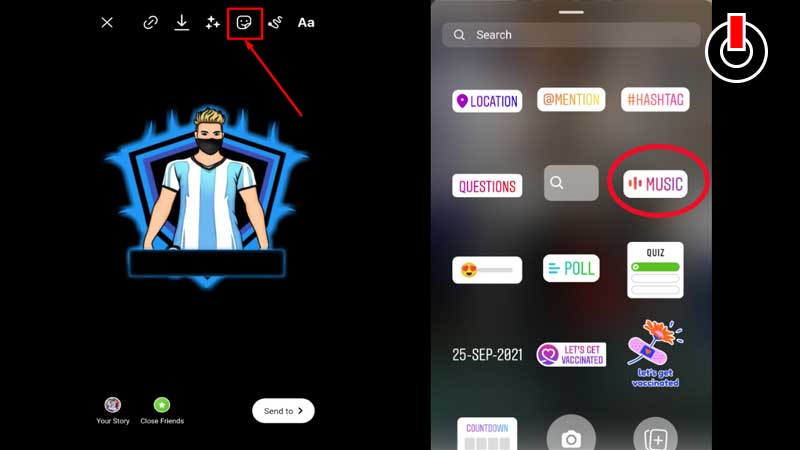
- In a new window, you will have to tap on the ‘MUSIC’ icon shown in the above picture.
- Now, you will have to select the desired song from the list.
- Once selected, tap on ‘Done’ option.
- When you do so, you will be asked to share Instagram Stories on Your Stories and With Close Friends.
- Tap on the Share option to upload your Instagram stories with your favorite song.
- That’s it.
That’s all you need to know about how to fix Instagram music not working issues and add songs to your Instagram stories. Follow these links you are facing issue with adding links in bio or your DMs are not working.