
After buying expensive phones, all iOS users have to spend plenty of money on the App Store to buy apps. If you have been an iOS user for a long period of time, you must have an idea of how difficult it is to get paid iPhone apps for free.
There are certain ways available on the internet where one can easily download and use paid iPhone apps for free. In this guide, we will talk about a few methods to get paid apps for iPhone and iPad for free. Without any further ado, let’s take a look:
Download Paid Apps For Free on iOS & iPad – Using Third-Party Stores
Not one there are plenty of third party stores providing paid iPhone apps for free. Some of the best third party stores that you can use to download paid apps for free are AppValley, TutuApp, AppEven, TweakBox, HipStore, vShare among others.
These third-party stores allow users to install paid iPhone apps for free. What all you need to do is to download any of these installers and download your favourite apps without jail-breaking your iPhone. We will use ‘AppValley’ to download iPhone apps for free.
- Open the Safari browser in your iPhone and visit https://appvalleyapp.com/.
- Once landed on the site, click on Install and pick either of the config profiles (try the other if one doesn’t work). You will see a message appearing on the screen which says, “This website is trying to download a new configuration profile.” Click on Allow.
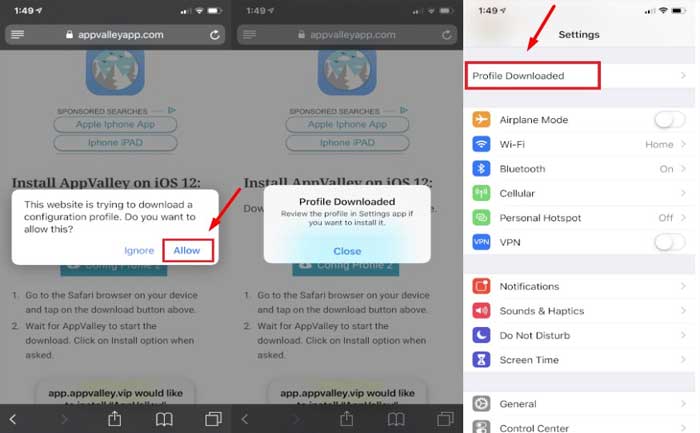
- You will be notified that profile her been downloaded. Close it and find the iOS Settings app.
- Click the ‘Profiled Download Option’ shown in the picture above. If not available, tap General and head to the Profiles and Device Management section.
- Select AppValley and click on the Install button. Enter your phone’s passcode if prompted. Press Install again, and you have it for free.
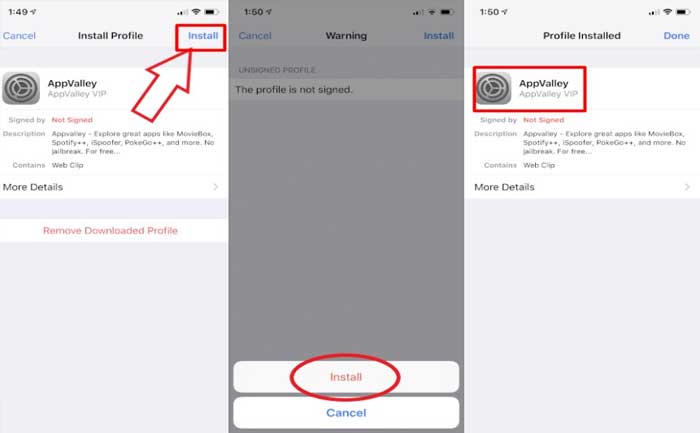
Once you have done all the steps correctly, you will have AppValley installed in your iPhone. Open the app through the home screen and search for the desired iPhone or iPad app to download for free. This app is reported to have some cool tweaks that will work even without jailbreaking your device.
Unfortunately, if you did not find the iPhone app you want to download for free at AppValley, you can opt for another installer. Notably, the installation process would be similar to all the installers that we have mentioned above.
Download Paid iPhone Apps For Free Using Free-trials for In-App Subscriptions
There is no denying of the fact that majority of iPhone apps are paid but plenty of them come with a free trial period so that people can try them for a limited period of time before they make a purchase. What all you need to do is to sign up to use any iPhone app for free for a limited period of time. If you did not like the app or find the subscription of the app is too costly, you can cancel the subscription so that you don’t get charged later.
You can use the free trials of all iPhone app from either App Store or in-app purchases. So, go to the App Store, click on Get Trial, enter your payment information, and proceed for installation. Once the app is installed, you can cancel the subscription at any time.
Don’t know how to cancel a free-trial subscription on iOS:
- Open the Settings app on your iPhone and click on your profile.
- Now, click on Subscriptions. If you don’t see the option, click on iTunes & App Store instead.
- Next, tap your Apple ID and click View Apple ID. Scroll down and click on Subscriptions.
- Tap Cancel trial and click Confirm.
Notably, the free-trial method would not help much for apps that you want to use for a longer period of time. However, you can use this facility for a limited period of time but this will surely help you save a lot of money.
Picking the Apps Gone Free
There are plenty of app developers often make their apps free for a limited period of time and this is where you get an opportunity to download paid iPhone apps for free without paying a single buck.
Don’t know where to find these apps? Well, you just simply need to install ‘Apps Gone Free’ app on your iPhone or iPad and go through the “Today’s Apps Gone Free” section to know which iPhone can be downloaded for free at the moment.
These are three methods to use and download paid apps for free on iOS. So, which method worked for you? Do let us know in the comment section below.