
Discord is one of the most loved platforms for gamers right now. Similar to other major platforms, Discord users will have to encounter issues or errors frequently. The error that users are currently having is ‘Discord awaiting endpoint’, preventing them from using the platform smoothly.
While you are here, you must be looking for ways to fix Discord awaiting endpoint error and if that’s true then look no further as we have got you covered. This post will not only teach you how to get Discord awaiting endpoint error fixed but also explain what this error is all about and what it causes.
Without any further ado, let’s get started:
Table of Contents
What Is the Discord Awaiting Endpoint Error?
The ‘Discord awaiting endpoint’ error occurs when Discord can’t establish a firm connection due to poor internet connection, server outage, or other issues. This is not the first time Discord users are encountering this issue and that’s the reason why have a bunch of solutions that could fix this error in 2022.
Sometimes Discord awaiting endpoint error gets automatically fixed after some time but if you want to fix it on an urgent basis then you will need to follow a few simple steps:
Discord Awaiting Endpoint Error Fix
As mentioned above, we have a bunch of solutions that you can apply to fix this Discord error. Let’s take a look at each solution and learn how they work.
Note: Before you apply any of the below-mentioned solutions to fix Discord awaiting endpoint error in 2022, I highly recommend you check the Discord server status. Yes, if the servers of Discord are down then none of these methods are going to fix this issue.
Are Discord Servers Down?
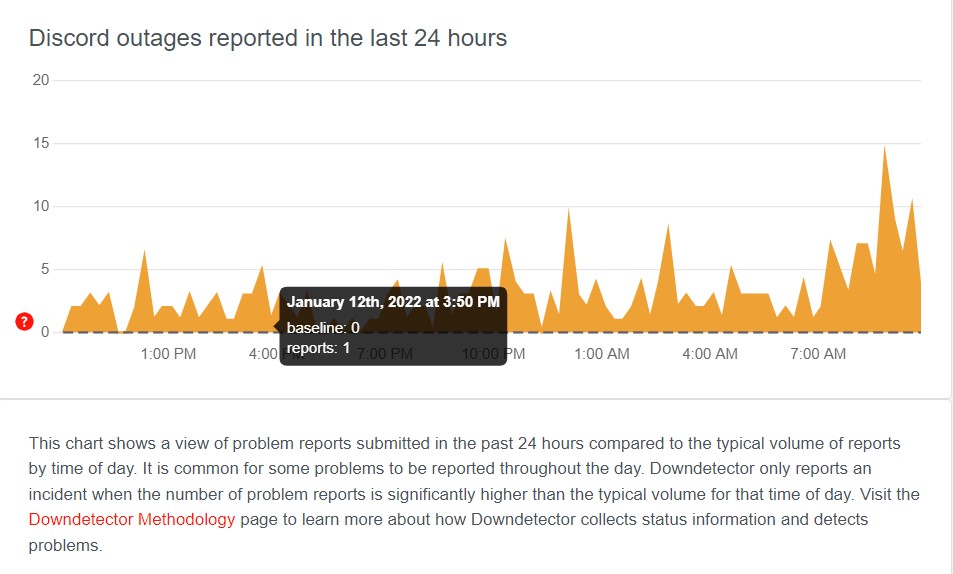
To check Discord server status, you will have to visit a third-party site called Downdetector and search for Discord. When you do so, you will be shown a graph showing the number of reports submitted in the last 24-hour. If the number of complaints is high it means the servers of Discord are not up.
If Discord servers are down then there is nothing that could fix Discord awaiting endpoint error. All you need to do is wait until the servers are back up again.
Restart Discord
Similar to other issues or errors, sometimes this error can be fixed by simply restarting Discord. If you have not restarted Discord yet then you must do it and check if the error remains.
Check Your Internet Connection
This might be the basic solution to every problem but it reported to have fixed Discord awaiting endpoint error for many. Before you go to the next solution, make sure the internet connection you are using to operate Discord is solid and reliable.
If you are using your Mobile data to use Discord then try switching it to Wifi or ethernet cable if you have. There are chances that this will fix this issue for you.
Update Discord
If you still are having the issue then you update Discord to the latest version. Usually, the Discord application is updated automatically but if you have not opened it in a while then you will have to do it manually. Once you have successfully updated Discord, run it as an administrator.
Uninstall & Re-Install Discord
The last solution that we have for you requires you to uninstall and reinstall Discord. When you do so, you will have the latest version of Discord installed on your device and you would not have any glitches caused by previous updates. Once installed, launch it and see if the error persists.
These were some of the solutions that can be used to fix Discord awaiting endpoint error in 2022. As soon as we come across more fixes, we will update this post.