
Jio from the time of its launch has provided its customer with several additional facilities, one of which is its free caller tune option. You can set any available song or tune as your caller tune from the Jio music app without any additional charges. Adding to this, there are many options to choose from. But, it may be the case that you no longer want caller tune, this article will help you to deactivate caller tune or JioTune from your Jio number.
How To Remove or Deactivate Caller Tune from Jio Number
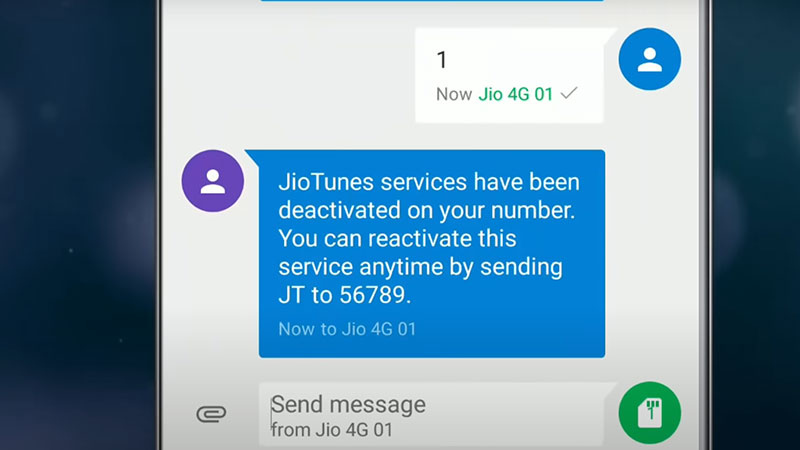
SMS Method
- Open your message app from the Jio number and start a new conversation with 56789 or 155223 as the recipient.
- Enter this message “STOP” and send it those numbers.
- You’ll receive a message “We have received your request to deactivate JioTunes Services. To confirm deactivation, please reply to this SMS with 1”
- Send 1, and you’ll receive another message clarifying that you have successfully deactivated your JioTune which is your caller tune.
- In case you want to reactivate it again, send “JT” on the same numbers.
Use Jio App
- Open your My Jio App, and check the number, if it’s not the number you want to deactivate tune from then choose + accounts option below that phone number and add your number or switch to it.
- Now scroll down a little, in the trending section you’ll see a JioTune option.
- Choose it, and you’ll see a box with “Your JioTune is active”, tap on it.
- If this option is not there then on the upper side of the screen you’ll see the My Subscription option, go in it and deactivate.
- You’ll see two options, select “Deactivate”, and you’ll receive confirmation.
- You can reactivate it following the same method.
Interactive Voice Process
- Go to your dialer and dial 155223 from your phone, you’ll hear an automated voice.
- It would first ask you to choose a language and then tell you details of your account, and then it will give you options.
- Once you have successfully deactivated your tune you’ll receive a confirmation SMS.
This guide explained how you can deactivate JioTune or caller tune in Jio number. Check out how to remove YouTube shorts.