
LootQuest is the latest game that everyone is currently talking about on Roblox. Similar to other Roblox games, fans of this game are searching for active, valid, working, and new codes for LootQuest and if that’s you then look no further as we have you covered. Besides providing a complete list of LootQuest Alpha codes, we will explain how to redeem these codes and earn free rewards.
If you are visiting Games Adda for the first time, I request you to bookmark and visit this page frequently as we will keep you updated with new LootQuest codes when they become available on the internet.
Without any further ado, let’s get started:
All LootQuest Alpha codes list (November 2022)
Unlike other sites, we not only test and verify every code that we update here but also mention both expired and working LootQuest codes separately. However, if you find any code enlisted in the Working codes section is either invalid or expired, do let us know in the comment section below so we can remove outdated codes from the list.
LootQuest Codes (Working)
Here are all the latest and active codes and what they provide when redeemed:
- SLEEPY – This code can only be redeemed in Whitelisted accounts.
- WELCOME – Redeem this code to get Diamonds (x200)
LootQuest Codes (Expired)
- There are currently no expired codes.
How to redeem codes in LootQuest?
Redeeming codes in this Roblox game is too simple. However, if you don’t know the code redemption process then follow the below-mentioned steps:
- Launch the game on Robox.
- Click on the Settings icon located on the bottom left side of the screen.
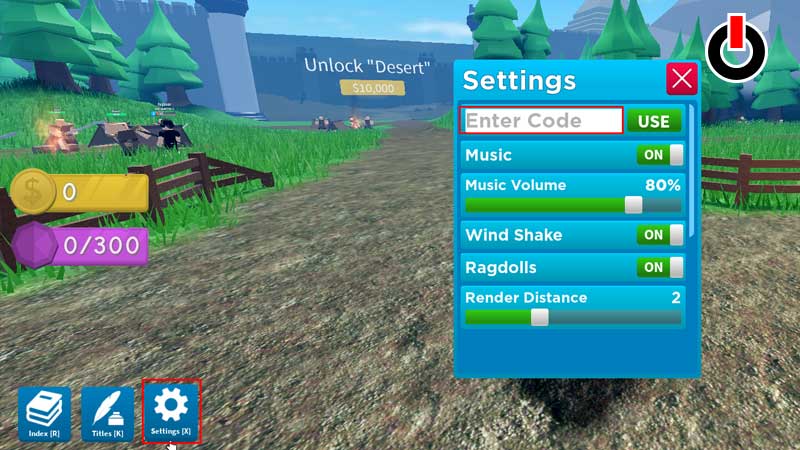
- In a new window, enter the working code into the text box that says ‘Enter Code‘
- Once entered, click on the ‘USE‘ button to claim your rewards.
Where to find new codes?
Getting your hand on new and working codes for this Roblox game is too simple. What all you need to do is follow the devs of the game on Discord and Twitter. Yes, these are two platforms where they drop new codes first. Otherwise, you can visit this page from time to time as we will keep you updated with additional codes when they are out.