
Saving the game you’re playing puts you in a safer corner. Having saved the game lets you revisit the level and retrace your gameplay to some spots that you may have missed. If you feel you’ve come up with an alternate plan to complete a particular mission, you can resume your game and play it again. Similarly, in this guide, you will learn how to Save your game in Fire Emblem Warriors Three Hopes.
How to Save game in Fire Emblem Warriors Three Hopes?
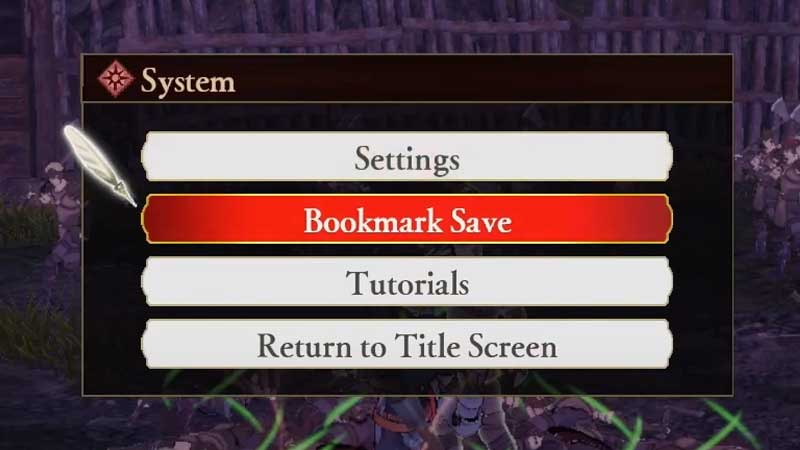
While playing Fire Emblem Warriors Three Hopes, you can Save your game in three manners. Auto Save, Bookmark Save and Manual Save. Auto Save occurs at the end of every chapter you play. Hence, you can revisit the chapter at anytime.
When it comes to Manual Save, you can save manually at any point in the game. In order to save manually, you have to
- Click on the Hyphen icon on your Controller
- Select Settings
- Click Save.
Coming to Bookmark Save, this comes into the picture when you’re in the middle of a Battle. When you’re about to start the battle, you can bookmark save it just in case you incur the casualties of your units or companions. Because if they die in the battle, you can’t revive them until the chapter is over.
But while using the Bookmark Save, you need to keep in mind that it works differently in both Casual and Classic Modes. So, beware of the mode you’re playing in before Bookmark Saving. To Bookmark Save, you have to click on the hyphen icon and click on Bookmark Save.
In Casual Mode, if you Bookmark Save the battle, you can still continue fighting in battle and can load the saved game again without any issues. But, when it comes to Classic Mode, upon clicking Bookmark Save, you will be redirected to the Main Screen, discontinuing from the battle. If you try to load the saved game, it will get deleted.
This is all you need to know about how to Save in Fire Emblem Warriors Three Hopes. Hopefully, this article was helpful to you. While you’re here, you can go ahead and check out how to Promote Characters in Fire Emblem Warriors Three Hopes and how to Cook in Fire Emblem Warriors Three Hopes.