
Genshin Impact Mobile is an open-world action RPG. The graphics on the game are stunning but sometimes players might still need to tweak their graphics settings. While it is not a complicated task, it is one that has many players stumped. If you are wondering how to change the resolution in Genshin Impact Mobile, we have the answers for you.
How To Change Resolution In Genshin Impact Mobile?
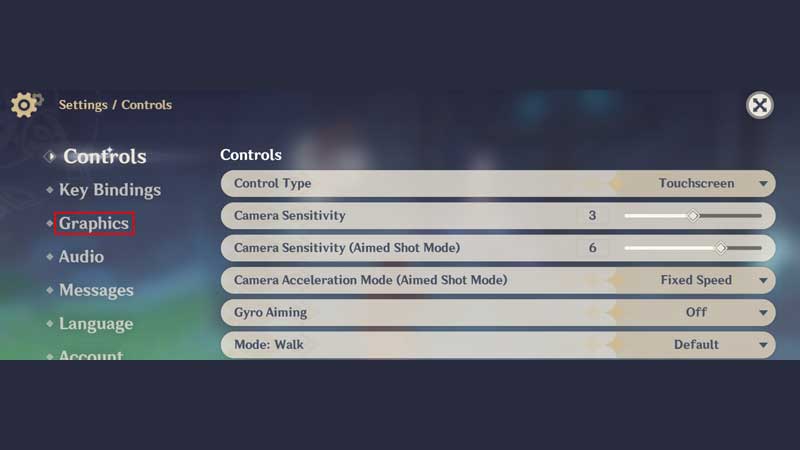
The first thing you need to know is that you won’t be able to adjust the game resolution straight away. The game starts with an intro and tutorial and until those are complete you will not be able to change the resolution in Genshin Impact. You will have to follow along with the tutorial and learn to perform the basics in the game before you would be allowed any autonomy in Genshin Impact Mobile. Once the game tutorial is over, you can follow the steps below to tinker with the resolution for the game.
- The first thing you need to do is click on the Paimon icon located in the top right corner of the screen.
- Next, you can click on the Settings option to get access to the game settings.
- Here, you will need to click on the Graphics option to change the Genshin Impact Mobile resolution.
- Under this option, you will see different graphics settings that you can alter. These include FPS, V-Sync, Render Resolution, Shadow Quality, and Visual Effects among other things.
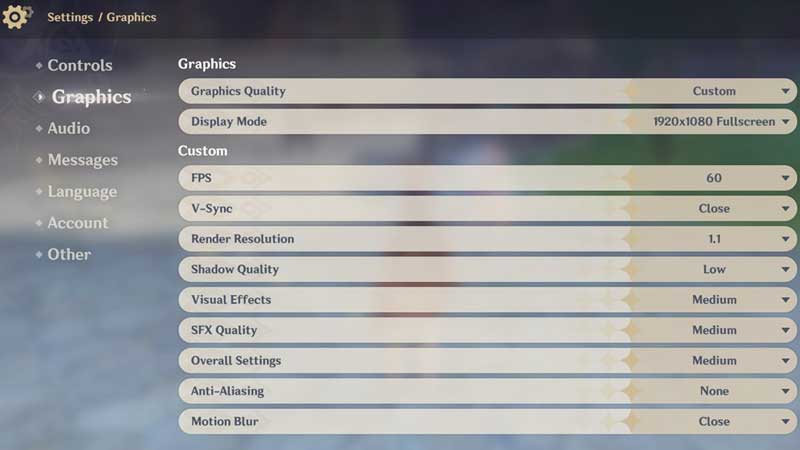
- You can click on the Render Resolution to change the setting.
- Once you have adjusted the Resolution, be sure to play the game and check if it is running smoothly with your game.
This is how you can change the resolution in Genshin Impact Mobile. Be sure to check whether your mobile is optimized to give primal performance while playing the game. If not, you can always check out the Best Android Phone To Play Genshin Impact