
Planning to throw a pool party for your Sims, but don’t have access to it. Read this guide and learn how to unlock and build a Pool in The Sims Freeplay. Pools also bring a Swimming hobby, so make sure you have a Sim without any hobby.
How to Unlock and Build a Swimming Pool in The Sims Freeplay
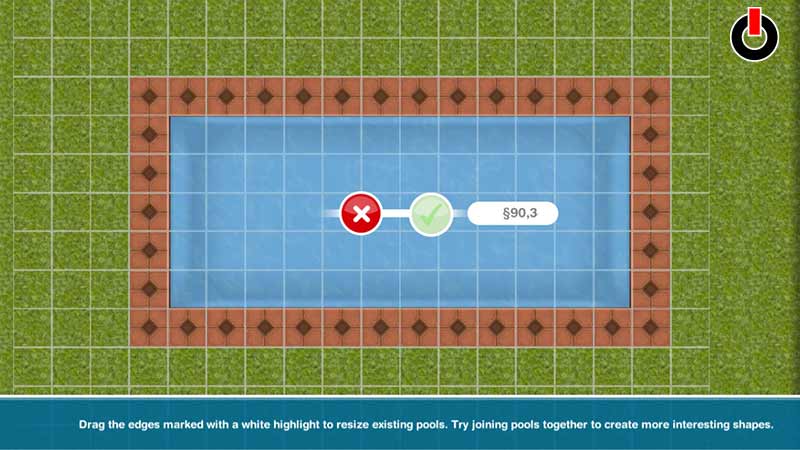
Go to your Home Store and select Pools. Drag and create a pool like how to do with Rooms. They are expensive, so be alert and precise. Now, if you don’t see that option in your Home Store or it is locked. Then that means you are not yet eligible for it. Simply put, you must complete a Quest called “It’s All Going Swimmingly” to build a Pool in The Sims Freeplay.
This quest becomes available when you reach level 13 and finish “A Quest for Toddlers”. The first requirement of the challenge is building a Swim Center. So make certain you collect a sufficient amount of Simoleons during its previous quest. Because you unlock Swimming Pools, even when you exceed the time limit. But you lose a volleyball pool set. Players get a two days limit for this challenge, and completing this also unlocks The Hidden Unicorn quest.
Most of its tasks take place in the Swimming Center. So have some Sims stay there finishing diving activities. In case you need more than one Sim for a task. Now, since we discussed everything that was needed to build a Pool in The Sims Freeplay. Let us now learn the steps in more detail.
- Start The Sims Freeplay on any mobile device.
- Go to the house with empty land.
- Tap on the icon with the chair and lamp on it, that is Home Store. It is in the bottom right part of the screen.
- Next, select the Pools option. It is golden.
- Drag and create a pool like your create Rooms.
- That’s all, now place your volleyball pool set there and enjoy the pool party.
This was all players needed to do to build a Pool in The Sims Freeplay. If you successfully build one and are searching for more Sims guides. Read how to start a Professions Shift and Reach Nirvana in the game.